
Summary
The DeviceExt acts as middleman which will send messages from various extensions to the remote Service and dispatch messages received from the Service to its descendant extensions.
Implementation
-
First you must setup a RealTimeConnector.
-
Drag and drop the component from the palette to any Component. As its name suggests, you can add it inside a Device, but you can also add it to a Node, a Folder etc.
-
Select a connector.
Properties
-
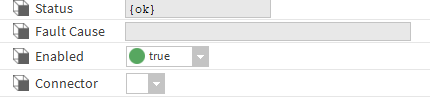
Status: Status of the DeviceExt.
-
FaultCause: Message that complements the DeviceExt state (generally used to explain the reason for an initialization failure).
-
Enabled: Indicates whether the Extension is enabled or not.
-
Connector: The Connector to bind to.
Actions
-
Initialize: Register the device and initialize the connection with the Service.
-
Disable: Disable the extension.
-
Clean: Unregister the device and clean the connection resources.
Fault Causes
-
Connector Not Found: if there is no connector in the Btib Service > External Connectors > realtime Connector folder, try to add one.
-
Any other: Just clean and initialize.