
Introduction
The tool can assign components to the model (for those who use the data structuration with Active-Framework). It requires Active-Framework to run on the station.
It assigns the component’s InfoSource to the given nodes in the given aspects. If the component has no InfoSource, an InfoSource is automatically added.
To assign a node, you must use what we call the model path: you must write the path to this node using the node's displayed name(not to be confused with the display Name, which might be different). If a node has a name with the character / inside, you must write */* instead.
Example: if you have a node with a displayedName equal to Module I/O , write Module I*/*O in the cell
From now on, the infoSource will only be initialized if there has been an actual change to the assignments.
Importing an assignment will remove other assignments only if needed
Description
You can assign an infoSource to multiple nodes in the same aspect by separating the different nodes with && (be careful, we're not using semicolumn here).
Below is an example with the three syntaxes
-
The first line creates a BacnetNetwork and assign it on the Location aspect to the variable $B1L1 which stands for Building1/Level1
-
The second line creates a BacnetDevice inside and assign it on the Nature Aspect to Air Handling/AHU
-
The third line creates a point inside the AHU and assign it to Duct/Return Air Temperature. There is no need here to add the full path with Air Handling/AHU before because the point is added inside the AHU which is already defined as an AHU. This a shorter way for describing the paths.
|
1 |
Internal id |
Base |
Template |
Name |
Assignment |
|
|---|---|---|---|---|---|---|
|
2 |
Id to reuse the component. Use# |
Reference where the component will be created |
Template name with subpath |
Name of the instance to create |
|
|
|
3 |
|
|
|
|
loc |
nat |
|
4 |
#Bacnet |
$Drivers |
$BacnetNetwork |
BacnetNetwork |
$B1L1 |
|
|
5 |
#AHU_01 |
#Bacnet |
$BacnetDevice |
AHU_01 |
|
Air Handling/AHU |
|
6 |
|
#AHU_01/points |
$BacnetPoint |
Return air temp |
|
/Duct/Return Air Temperature |
Sub column names
Create a column called "Assignment" and then create a subcolumn with the short name of each aspect.
The inheritance will have the priority over the assignment when importing.
During the export, if the Assignment Column is also present, the path to the node will be displayed in the adequate subColumn, with the "info:" prefix.
During the import, if an assignment starts with the "info:" prefix, it will be ignored.
Accepted value
-
For Entity and Definition Set Aspects (by priority during the export) :
-
Variable associated to a complete path
-
Relative model path from the node (using the displayNames) in the parent IF the parent in the base is designated by an id
-
Complete model path to a Node (using the displayNames)
-
-
For Entity Set Aspects ONLY, you can directly target a Node via it’s:
-
SlotPath (you will need to include “slot:” or “station:” at the beginning)
-
InternalID (the full value in the InternalId column)
-
Id (the value in the Node “Id” slot, you will need to prefix your value with “id:”)
-
Try it yourself !
Here is the file used in the above import example. Download it, try importing it and see the result. For this import to work you will need the Active Framework, and the Building1/Level1 and the Air Handling/AHU/Duct/Return Air Temperature Nodes (in the location and nature Aspect respectively)
EXPORT
A subColumn will be created for each of your available aspect.
If you have the Active-Framework and some nodes, the export will fill the ~Model Sheet, and thanks to this sheet, it will create dropdown lists for each SubColumn in the assignment column.
The columns are created automatically depending the Aspects of your stations.
By default, only the absolute or the relative model path will be exported (or a variable targeting a model path).
If you desire to export id values, add the ":id" suffix to the subcolumn name. All the values in the column will be exported as ids.
It is not possible to export SlotPaths or InternalIds.
Example of a Model sheet
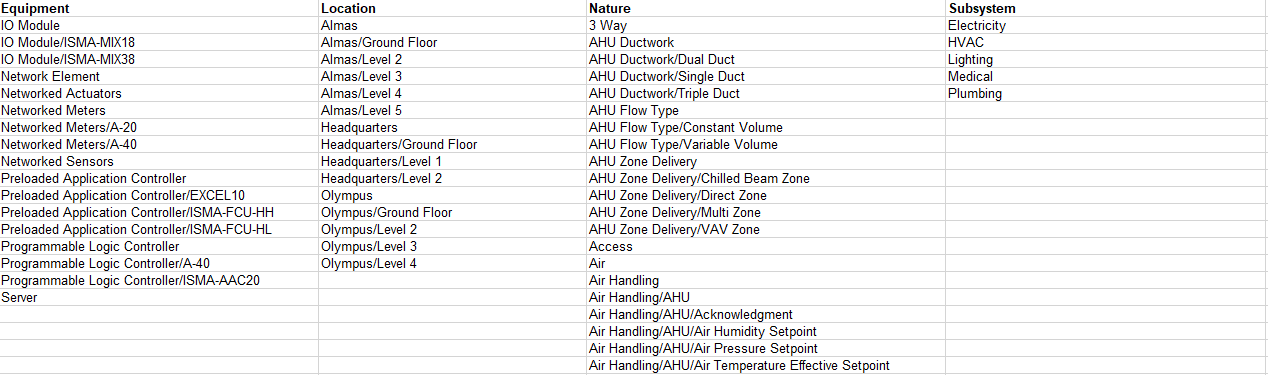
The dropdown list for an aspect is created only if there are some nodes in this aspect.