
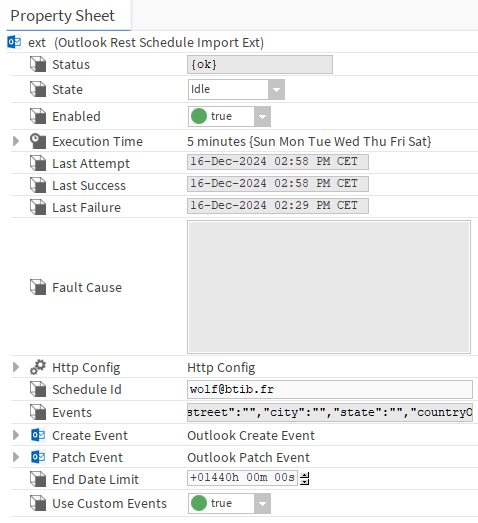
When you have successfully configured the synchronization between Microsoft outlook and your Niagara schedules you can now start importing your events. There is two slots in the Outlook rest schedule extensions that are specific to the recurring events. The extensions can deal with all the recuring events type that outlook creates.
-
End Date limit is used to specify the limit of importing events. For example if you have an events planned during two years on Outlook and and End date limit set at 6 months, you will only see the events for the next 6 months.
-
Use custom events: specify if you can use custom events or you only use the other type of events.
Http config examples
Finally when everything is working you can encounter some issues due to the request you are sending.
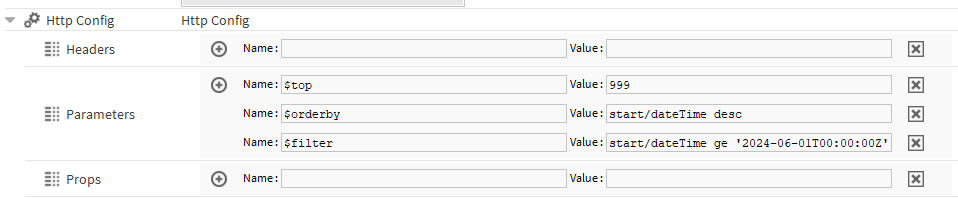
First important information, the outlook API supports pagination, it meens that by default the request is sending 10 events and a link to the next page. It could be a problem if you need to get more events, we recommend to use some filters and params in the request to get what you really want.
-
$top: the number of events you want to get,
-
$orderby: order the element on the startDate (descending or ascending)
-
$filter: get only the events which starts after a certain date.
Using these parameters will help you get the event you want. But you need to understand how the outlook API is working, regarding the recurrent event. If an event as been planned 5 years ago and you request the event from the last 6 months, it is not going to appear, even if there is an occurrence every week. The start date of a recurring event is the first occurrence of the event. It means that some times it is gonna be a long time ago back in time.
Last point, be careful with the top parameters because if there is too much event, the request might timed out.
WARNING:
There is some configurations you can do on Outlook to extend the booking window:
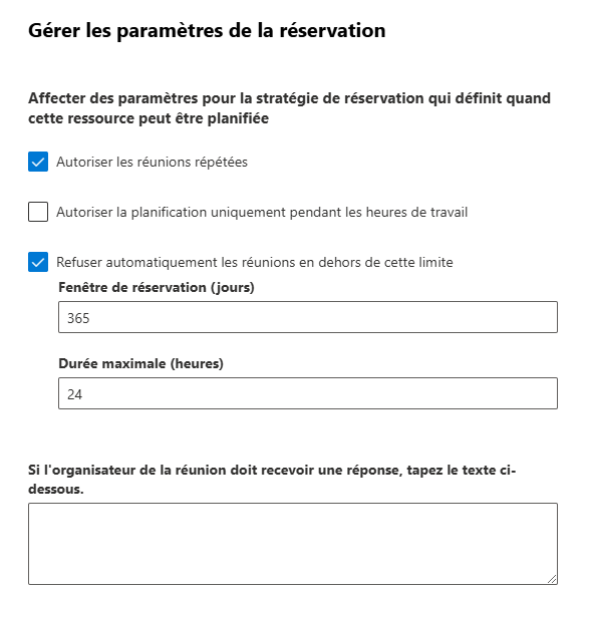
By default the booking window is set to 6 months but you can extend it up to 3 years. Depending on your configuration a room can’t be book indefinitely, there is always a limit and this limit is the booking window. For example if you create a recurring meeting every week in a room without an end date and you configuration doesn't a romm to be booked without an end date:
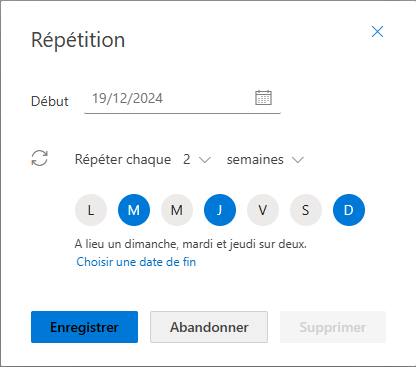
It means that you have accepted the meeting indefinitely but the room can accept it only during the booking window you have set. So if you look in your schedule you will see the meeting “for ever” but if you look in the room schedule you will only see the meeting for the next 6 months.