
Summary
The Json Key Selector is used in all RestProxyExts (RestPointProxyExt and ArtifactProxyExt of the ArtifactDefinition). It is also used in the Artifact Selector.
It allows selection of a value in a JSON file (see HTTP and Web APIs for more details on the JSON format).
Implementation
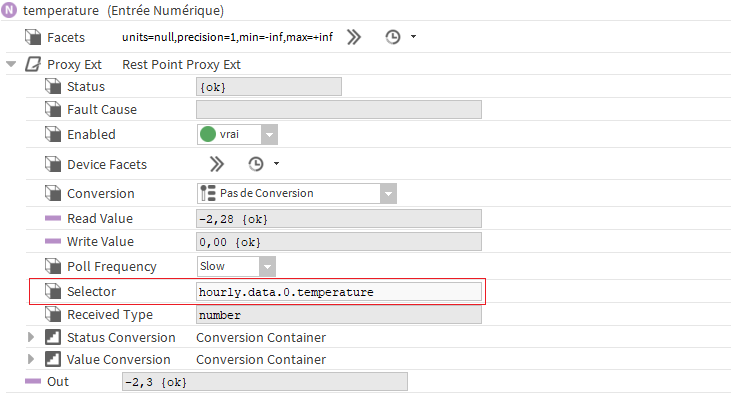
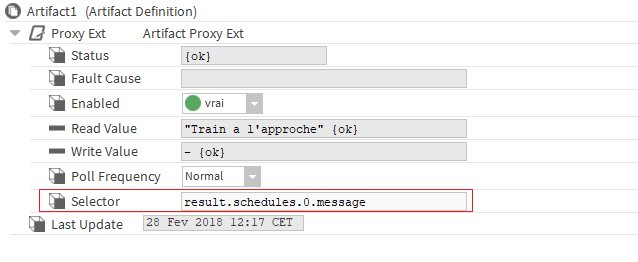
It is present in the RestPointProxyExt Selector and the ArtifactDefinition ArtifactProxyExt properties and is used with the syntax described below.
In the RestPointProxyExt
In the ArtifactDefinition
Syntax
Remember, the JSON data format is characterized by a nesting of objects and tables of data. Data is always accessible through a key in an object or an index for an array.
In the Json Key Selector syntax, each key or index is separated from the next by a period (.).
For example, for the following JSON:
{
    "currently": {
        "time": 1519817193,
        "summary": "Windy with Scattered Clouds",
        "temperature": -2.04,
		"coordinates": "2.3522219, 48.856614",
		"day": "15"
    },
    "hourly": {
        "summary": "Windy and cloudy all day.",
        "data": [
            {
                "time": 1519815600,
                "summary": "Windy with Scattered Clouds",
                "temperature": -2.28
            },
            {
                "time": 1519819200,
                "summary": "Windy with Scattered Clouds",
                "temperature": -1.75
            }
        ]
    },
    "daily": {
        "summary": "Light rain tomorrow until Saturday, temperatures rising to 10°C Sunday.",
        "data": [
            {
                "time": 1519772400,
                "summary": "Windy all day and cloudy from start of the afternoon.",
                "temperatureHigh": 0.03,
                "temperatureLow": -0.41
            },
            {
                "time": 1519945200,
                "summary": "Light wind until afternoon and cloudy throughout the day.",
                "temperatureHigh": 8.53,
                "temperatureLow": 5.24
            }
        ]
    }
}
To select the temperature at the moment of the request:
currently.temperature
To select the expected temperature in one hour:
hourly.data.1.temperature
To select the maximum temperature for the current day
daily.data.0.temperatureHigh
To select the last temperature, use the keyword "last"
daily.data.last.temperatureHigh
To select the first temperature, use the keyword "first"
daily.data.last.temperatureHigh
To select all the values (for histories for example), use the keyword "all"
daily.data.all.temperatureHigh
To select all the values in reverse order (for histories for example), use the keyword "allRevert"
daily.data.allRevert.temperatureHigh
To make an average on the numerical values in an array, you can use the average feature
daily.data.all.temperatureHigh.avg()
To find the highest value of the numerical values in an array, you can use the max feature
daily.data.all.temperatureHigh.max()
To find the smallest value of the numerical values in an array, you can use the min feature
daily.data.all.temperatureHigh.min()
To make a sum of the numerical values in an array, you can use the sum feature
daily.data.all.temperatureHigh.sum()
To filter some values, you can use the filter predicate feature
data.filter('id','myId').first.value
To filter on inner keys, you must escape the points with square brackets ex: filter('firstKey[.]innerKey','myValue')
To split a string into several values, use the keyword "split" with the delimiter as parameter
currently.coordinates.split(',').item(0)
To convert some values from String to double or boolean, use the keyword "toDouble" or "toBoolean"
currently.day.toDouble
The table indices start at zero.
The avg(), max(), min() and sum() functions are terminal operations. Adding another key after the function won't work