
Introduction
You can define conversions for points (in the proxy extension)
For the moment, there are three supported keywords:
-
default: it will set the conversion to the default conversion
-
linear(x,y): it will set the conversion to Linear with a scale x and an offset y
-
reversePolarity: it will set the conversion to Reverse Polarity
You can wrap it up in a variable in the dedicated pairs of columns.
Example
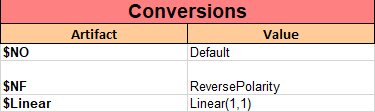
Then in the Excel file
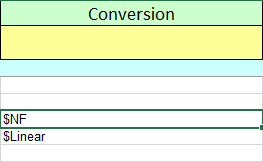
Columns syntax
Create a column and give the name "Conversion". There is no need for subcolumns.
Accepted values (by priority during the export):
-
Variable
-
Conversion Keyword
Try it yourself !
Here is the file used in the above import example. Download it, try importing it and see the result.