
Used as
-
Card
Summary
This card allows you to manage the Alarm Extension associated with a point.
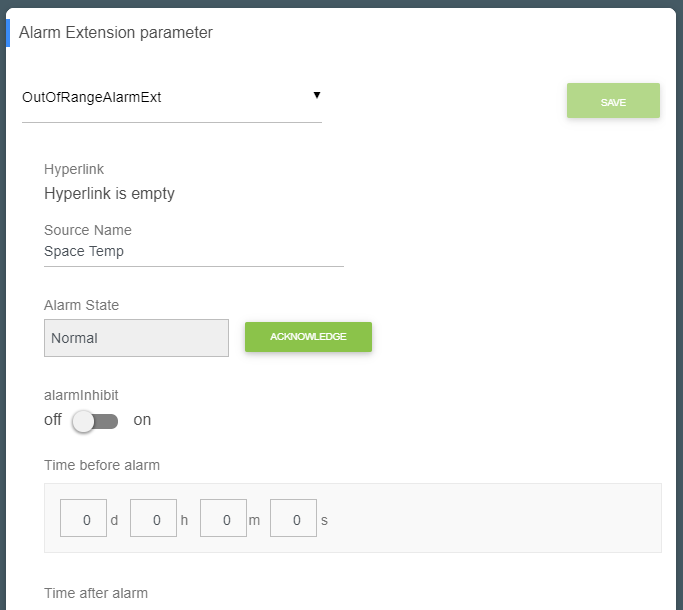
The Flex View must be created directly on the point containing the Alarm Extension.
Setup
Before adding the card, make sure that an Alarm Extension is configured on the point.
Create a Flex View directly on the point containing the Alarm Extension.
For example:
NumericPoint
├── Proxy Ext
├── OutOfRangeAlarmExt
│   ├── Fault Algorithm
│   └── Offnormal Algorithm
└── AlarmExtension (Flex View)
Open the Flex View, add a card from the settings bar, and select AlarmExtension from the list.
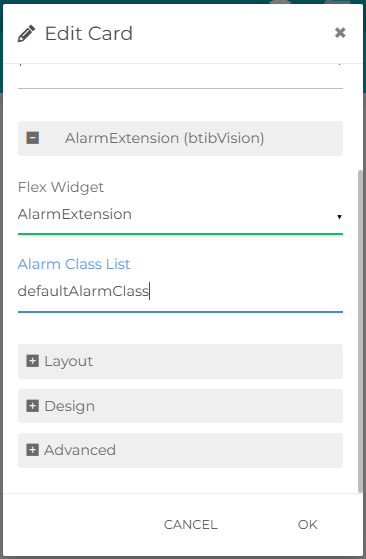
Configure the Alarm Class List property. You can either specify an Alarm Class directly, such as:
defaultAlarmClass
or use an SFormat expression to retrieve the available Alarm Classes dynamically.
Example for retrieving Alarm Classes associated with a subsystem:
{origin.infoSource.node('sub').relations('in','b:isAlarmClassOf')}
This card has its own save mechanism. After changing values, don't forget to click SAVE to apply the changes.

Flex Widget Properties
-
AlarmClassList: SFormat used to define the Alarm Classes available in the card.
An Alarm Class can be specified directly, for example:
defaultAlarmClass
An SFormat expression can also be used to retrieve Alarm Classes dynamically.
Example for retrieving Alarm Classes associated with a subsystem:
{origin.infoSource.node('sub').relations('in','b:isAlarmClassOf')}