
Introduction
There are properties in Niagara that can contain scripts: those are the formats (BFormat and SFormat).
A format can contain hard text as well as functions that apply to a target, called base or origin.
The two types of formats have several differences:

The BFormat
A BFormat slot looks like this:

It is used in alarms and in history. It allows applying the same script at each point to dynamically create the sourceName, historyName etc.
The BFormat syntax
Text1 %format1% text2 %format2
The BFormat can contain hard text (text1 and text2) as well as scripts that must be defined between percents % (format1 and format2).
Scripts are composed of keys that are separated by points .
%key1.key2%
The keys are solved one after the other. There is no limit to the number of keys.
%parent.displayName%
-
We start from the base
-
parent: the parent of the base becomes the new base -
displayName: we get the displayName of the new base
Example on an alarm extension
In the alarm extension of a point, the "sourceName" property is a BFormat. This format is resolved in relation to the extension itself.
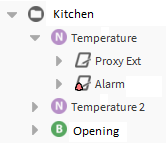
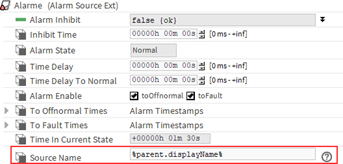
-
%displayName%: Alarm -
%parent.displayName%: Temperature -
%parent.name%: Temp$e9rature -
%parent.parent.displayName% : %parent.displayName%: Kitchen Temperature -
%parent. out%: 22°C {alarm} -
%parent.out.value%: 22°C -
%parent.out.status%: {alarm} -
%parent.out.status.isAlarm%: true -
%parent.parent.Opening.out.value%: false -
%parent.parent.Temp$e9rate$202.out.value%: 19°C
The keys to BFormat
Any slot of the base can be called by the Bformat.
A slot must be called by its encoded name (parent slot sheet > name).
Since implied tags are not slots, they cannot be retrieved by BFormat.
The Java methods of the base can also be called. You can look at the Bajadoc of the components to see the available methods. Only GET methods can be called.
Example on an alarm extension
We can call the "elapsedActiveTime" property of an extension of type DiscreteTotalizerExt to recover the running time.
-
%elapsedActiveTime%: 6 days, 21 hours, 8 minutes, 53.156 seconds.
This is a RelTime property. If we look at the Bajadoc, we can find the following methods:
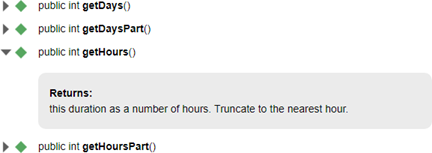
We can therefore call these methods through the BFormat, by removing the "get" and starting with a lower case letter:
-
%elapsedActiveTime.days%: 6 -
%elapsedActiveTime.daysPart%: 6 -
%elapsedActiveTime.hours%: 165 -
%elapsedActiveTime.hoursPart%: 21
The special keys of BFormat
%name%
Retrieves the encoded name of the base.
%displayName%
Retrieves the display name of the base.
%slotPathOrd%
Retrieves the path to the base. Be careful, it starts directly with slot: and it is often necessary to add station:| in front.
Ex: station:|%slotPathOrd%
%parent%
Retrieves the parent of the base, which becomes the new base.
%time()%
Get the current time of the host evaluating the BFormat (attention: it can be the one of the PC displaying the view)
Ex: 19-Feb-21 9:22 AM CET
%user()%
Retrieves the username of the session (rather used on the view/client side)
Ex: admin
%lexicon(module:key)%
Retrieves the translation of “key”
Ex: lexicon(driver:pingSuccess) returns Ping Réussi in French
%format.substring(to)%
Removes the first x characters of a text:
-
%displayName%: « Temperature » -
%displayName.substring(3)%: « perature »
%format.substring(-fromEnd)%
Retrieves the last x characters of a text:
-
%displayName%: « Temperature » -
%displayName.substring(-3)%: « ure »
%format.substring(to,from)%
Retrieves the text between the two indexes:
-
%displayName%: « Temperature » -
%displayName.substring(3, 6)%: « per »
%format.escape()%
Transforms special characters into their encoded values
-
%displayName%: « Temperature » -
%displayName.escape()%: « Temp$e9rature »
%format.unescape()%
Transforms special characters from their encoded values
-
%name%: « Temp$e9rature » -
%name.unescape()%: « Temperature »
%format1?format2
Try to solve format1. If it returns an error ("err:..."), then format2 is resolved and returned.
Ex: %shortName?displayName%. If the shortName slot is not found on the base, then the displayName will be returned.
The SFormat
The SFormat slot looks like this:

The SFormat Syntax
Text1 {format1} text2 {format2}
The SFormat can contain hard text (text1 and text) as well as scripts that must be defined between braces { } (format1 and format2).
Scripts are defined by a sequence of functions. A function has a name and can have parameters.
Its syntax is the following: {function(param1, param2)}
Helper
All available functions are indexed in the SFormatHelper, which can be opened by clicking on the 
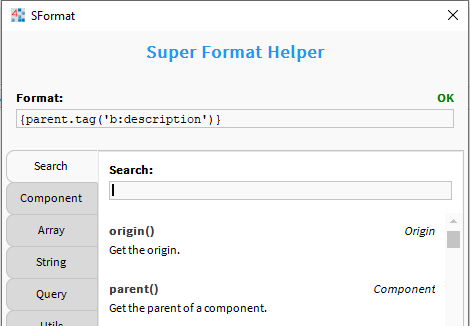
Specificities
In a SFormat, we distinguish between the base and the origin.
-
The origin is the initial object on which the SFormat was executed. It is never modified during the resolution of the SFormat.
-
The base is the object on which a given function is executed. It varies during the resolution of the SFormat.
Ex: {origin.parent.%displayName%} on a temperature point.
The origin will always be "Temperature".
The base is first the "Temperature" point, then becomes the parent folder "Folder" (which will be used to resolve the displayName).
Note that at the very beginning of a SFormat, the base and the origin are identical.
Chaining
The functions are chained with a point . and they are executed one after the other.
Ex: {origin.outRel('b:isIn').outRel('b:isRentBy').tag('b:customercode')}
-
originis resolved from the base. Result: "Developer's office". -
outRel('b:isIn')is resolved from “Developer Office”. Result: "Floor1". -
outRel('b:isRentBy')is resolved from “Floor1”. Result: "VayanData” -
tag('b:customercode')is resolved from “VayanData”. Result: "VD"
Functions
Some functions have no parameters: empty parentheses become optional.
Ex: {parent()} can be written as {parent}
The SFormat can call BFormat which runs against the current base.
Ex: {outRel('b:locSourceOf').%displayName%} where the displayName applies to the endpoint of the relationship b:locSourceOf.
The SFormat can work on a base which is a table.
In this case:
-
If the following function is applied to an array (see "array manipulation functions") then the entire array is processed.
Ex: {children.length} returns the length of the children array.
-
If the following function does not apply to an array, then the function is repeated on each element of the array.
Ex: {children.%displayName%} applies the BFormat script %displayName% to each child of the base. The result is an array with all the displayNames of the children array.
Nested SFormat
A SFormat can be nested in another SFormat.
There is no limit on the levelt of nested SFormats, you can nest as many as you want. So you can make a SFormat in a SFormat in a SFormat...
The deepest SFormat is resolved first.
Ex: {ord('station:|slot:/Mapping').slot('cas{origin.tag('b:numero')}’)}
-
{origin.tag('b:numero')}is resolved first and returns "5". This result takes place in the parent SFormat. -
{ord('station:|slot:/Mapping').slot('cas5')}is then resolved and fetches the "cas5" slot of a component named Mapping.
Special characters
In SFormat, many characters are used for special functions:
-
.separates functions -
,separates parameters in a function -
( )encapsulates the parameters of a function -
' 'defines a String parameter -
{ }encapsulates the Sformat -
[ ]prevents a SFormat to be resolved (explanation below)
All these characters are banned from being used as parameters.
Indeed, they cannot be used in parameters under penalty of being interpreted.
When you need these characters inside a parameter, you must protect them with [ ]
Any text enclosed in square brackets will never be interpreted by the SFormat.
For example, we want to make a query like this: {ord('station:|slot:|bql: select displayName, slotPathOrd from control:ControlPoint')}
This query contains a comma , and so the SFormat believes that there are two parameters:
-
Parameter 1:
station:|slot:|bql: select displayName -
Parameter 2:
slotPathOrd from control:ControlPoint
The comma must be protected to tell the SFormat that it should not be interpreted: {ord('station:|slot:|bql: select displayName[,] slotPathOrd from control:ControlPoint')}.
If you want to protect your SFormat twice, encapsulate it in two layers of brackets:
{origin.slot('cas[[{origin.tag('b:numero')}]]’)}
This is useful if the SFormat is resolved several times and you want to keep it untouched for a particular purpose.
The basic functions of SFormat
{origin} or {base}
This is the basis on which the SFormat will evaluate itself.
For a SFormatTester, {origin} is the parent of the SFormatTester.
In strategies, {origin} is the node or infoSource on which the strategy is executed.
{parent}
Retrieves the parent of the base.
Ex: If the base is an extension, {parent} returns the point.
{slot('param')}
Retrieves any slot of the base.
-
param: The encoded name of a slot
Examples:
-
{slot('b$3adescription')}returns the description slot (the unencrypted name of a slot). -
{slot('b:description')}returns the same result (in this case, the first slot found is returned). -
{slot('baja:AbsTime')}returns the first slot of type AbsTime.
{children('type')}
Retrieves all direct children of the base of a certain type of component.
The type parameter is optional. If it is not specified, the function returns all the child components of the base.
Examples:
-
{children('baja:AbsTime')}returns all slots of type AbsTime. -
{children('btibToolkit:BqlToWidgets')}returns all BqlToWidgets which are direct children of the base. -
{children}returns all child components.
{ord('query')}
Allows you to execute a query on one or more components: a slotPathOrd, a BQL, or a NEQL.
The query can be relative to the base.
The result of this function is always an array containing the results of the query.
Ex: {ord('slot:|bql :select * from control:ControlPoint')} query relative to the base.
Functions on tags and relations
{tag('tagId')}
Retrieves the value of the tag with the selected id. Works with direct tags and implied (contrary to the BFormat).
Examples:
-
{tag('b:shortName')}on a property. In BFormat:%b$3ashortName% -
{tag('b:description')}on an implied tag. Impossible in BFormat
{relations('direction', 'relationId')}
Retrieves the endpoints of the selected relationships.
-
direction:-
in: for incoming relationships
-
out: for outgoing relationships
-
both: for all relationships
-
-
relationId: the id of the relation
The result is an array containing the endpoints.
Ex: {relations('in', 'n:child')} retrieves the components linked to the base by a relation incoming n:child (in other words, retrieve all the children in the base).
{outRel('relationId')}
Retrieves the first outgoing relationship with the selected id. This is a shortcut for {relations('out', 'relationId')}.
The result is directly the endpoint (not an array).
Ex: {outRel('b:isIn')} retrieves the first component linked to the base by a relation b:isIn outgoing (i.e., retrieves the building if the base is a floor).
{inRel('relationId')}
Retrieves the first incoming relation with the selected id. This is a shortcut for {relations('in', 'relationId')}.
The result is directly the endpoint (not an array).
Ex: {inRel('b:isIn')} retrieves the first component linked to the base by a relation b:isIn incoming (in other words, retrieves the first office if the base is a floor).
The array manipulation functions
{first} and {last}
Retrieves the first or last element of an array respectively.
Ex: {children.first} returns the first child of a component.
{item(index)}
Retrieves the element at the given index of the array. The index starts at 0.
Ex: {children.item(2)} returns the 3rd child of a component.
{length}
Returns the size of an array.
Ex: {ord('slot:|bql :select * from control:ControlPoint').length} returns the number of points inside the origin.
{removeFirst} and {removeLast}
Returns the array without its first value and without its last value respectively.
Ex: {VC.removeFirst} where VC contains an array of all the VCs in a zone. The first one is the master, we want to get only the slaves.
{removeDuplicates}
Returns the table by removing the duplicates.
Ex: {relations('both', 'b:discussWith').removeDuplicates} where the array of relations could return the same element twice.
{display('[format]')}
Executes an SFormat on each element of the array. The result is a text composed of the result of all formats.
Be careful, the SFormat will contain special characters. It is therefore encoded in square brackets [format] to prevent the parent SFormat from interpreting it.
You can use \n to return to a new line between each result.
Ex : {children.display('[Child: %displayName%\n]')} will look for all the children in the base, will apply the SFormat Child: %displayName% \n for each child and then will concatenate all the results : Child: Distrib Child: Operations Child: VayanData
The functions dedicated to the model
{node(level)}
Retrieves the ascending node of a node at a given level.
This function only applies to working nodes regardless of the number of b:isIn relationships to be retrieved.
Examples: we are looking for the site (level 1) in which the following nodes are located:
-
Building A:
{outRel('b:isIn')} -
Floor 2:
{outRel('b:isIn').outRel('b:isIn')} -
Office:
{outRel('b:isIn').outRel('b:isIn').outRel('b:isIn')}
Here different formats are needed depending on the base. Using the {node(1)} function allows you to replace all of them.
{node('aspect', level)}
This is the same function for InfoSources. The difference is that you must give the aspect to be traced back to (since an infoSource is linked to several aspects).
The aspect must be identified by its shortName.
Ex: {node('str', 1)} to find the (level 1) site on the structure aspect (str) from an infoSource. The function will pull up the relationships b:strSourceOf (assignment), b:strSubSourceOf (inheritance) and b:isIn.
{infoSource}
Retrieves the infoSource from the base.
This is a shortcut for {slot('InfoSource')}.
Ex: {point.infoSource}
Text manipulation functions
{split('text')}
Split the base according to a text (or a character).
Ex: {%displayName%.split('_')}
Let's suppose that the displayName is "TEMP_EXT_Z04_S005", the result will be an array composed of 4 elements : "TEMP", "EXT", "Z04" and "S005". We can then retrieve each element with the function item(x).
{number(maxChars)}
Extracts a number at the end of a text. Useful to retrieve the number of Lon objects.
The parameter indicates the maximum number of characters to extract: one character to extract for numbers up to 9, two characters to extract for numbers up to 99, three characters to extract for numbers up to 999, etc.
Ex: {%name%.number(2)}
Suppose that the name could be "store1" or "store12", the result would be respectively "1" or "12"
{prefix('text')}, {suffix('text')} and {orEmpty}
These functions allow displaying nothing if the base is null. If it is not, they add respectively a prefix to the text, a suffix to the text or the text alone.
They allow you to avoid errors like "err:" or "null" in the result.
Ex: {tag('b:site').suffix('-')}{tag('b:building').orEmpty}{tag('b:floor').prefix('-'}
-
BTIB - Building 1- Floor2if the base has all the tags -
BTIB - Building1if the base does not have a b:floor tag -
{replace('text', 'replacement)}
Replaces the text of the first parameter with the text of the second parameter in the base (which must be a text).
Ex: {%name%.replace('ventilo', 'VC')}: "ventilo34" becomes “VC34”
Ex: {%displayName%.replace('_', '')}: "TEMP_EXT_006" becomes “TEMPEXT006”
The calculation functions
{add(x)}, {subtract(x)}, {multiply(x)} and {divide(x)}
Returns the result of the operation (respectively addition, subtraction, multiplication, or division) of the base (which must be a number) and the number x.
Ex: {tag('b:level').add(1)} on a level node will1 return "2"
The conversion functions
{toString}, {toInt}, {toDouble}, {toOrd}, {toBrush}
Convert the base to String / Integer / Double / Ord / Brush respectively.
Ex: {tag('surface').divide(100).toInt} to get an integer
{toSimple('type')}
Convert the base to Simple whose type is passed in parameter.
Ex: {toString('false').toSimple('baja:Boolean')} to create a false boolean.
Functions on conditions
{equals(value)}
Returns a boolean (true if the base is equal to the parameter, false otherwise).
The parameter can be a text, a number, or even a SFormat.
Examples:
-
{%displayName%.equals('Point')} -
{%name%.number(2).equals(10)}
{like('*value*')}
Returns a boolean (true if the base (which must be a text) matches the pattern passed in the parameter.
The wildcard * can be used at the beginning, at the end or both.
Example:
-
{%displayName%.like('*Numeric*')} -
{%name%. like('VC_*')}
{greaterThan(value)} and {lessThan(value)}
Returns a boolean (true if the base (which must be a number) is respectively greater or smaller than the parameter, false otherwise).
Ex: {tag('b:surface').greaterThan(200)}
{not}
Returns the negation of the base (which must be a boolean).
Ex: {tag('b:metier').equals('HVAC').not} returns true if the job is not HVAC.
{ternary(condition, value1, value2)}
A ternary allows to return a result according to a condition. If the condition is valid, the first parameter (value1) is returned; otherwise, the second parameter (value2) is returned.
The condition must return a boolean. The condition and the two parameters can be nested SFormats.
Ex: If the zone is an office we want to write "Office", otherwise we want to write "Other":
-
The ternary looks like this:
{condition, 'Office', 'Other'} -
The condition is:
{tag('b:typeZone').equals('Office')} -
By integrating the condition, we have a nested SFormat:
{{tag('b:typeZone').equals('Office'), 'Office', 'Other'}
Tips and tricks
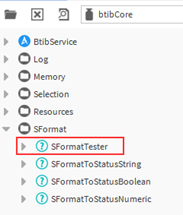
SFormatTester
The SFormatTester is a component in Active to test formats (BFormat and SFormat).
It can be found in several palettes, notably in btibCore > SFormat.
The Format is resolved in relation to the component in which the SFormatTester is located.
Ex: If we put a SFormatTester in an extension alarm, it will be resolved in relation to the extension and allows so to test the format to put in sourceName.
Write step by step
Write the functions one by one and check the result each time.
Ex:
-
Start with
{origin.parent}and check that we have the expected result -
Then add another function:
{origin.parent.outRel('b:strSourceOf')}and check -
And so on…
{origin.parent. outRel('b:strSourceOf').tag('b:typeZone')}until the entire SFormat is written