
Summary
The REST Network is a web-based client that connects to the REST WebServices (commonly referred to as APIs) and retrieves data in the Niagara environment. It can convert data from RESTful HTTP APIs to Niagara format. It can connect to servers from a system BUT CANNOT create a REST API in a system. The connections are therefore always outgoing.
The RestNetwork is designed so that a Network is used per service to be contacted. For example, it requires two RestNetworks in a system to interact with the SigFox and RTE APIs.
Current state
The REST Network only manages APIs that provide data in JSON format. Other formats such as HTML, XML, Yaml, CSV or binary data such as files are not supported at the moment. It can convert all data received in a JSON file into read-only control points, (BooleanPoint, NumericPoint and StringPoint).
It does not yet manage alarms or logs.
Implementation
There are two options for adding a RestNetwork:
-
Dragging the RestNetwork from the palette into the Niagara Drivers folder.
-
Using the DriverManager and selecting RestNetwork from the drop-down list of the "New" command.
When creating, remember to enable the RestNetwork by setting Enabled to true.
We recommend that you enter the host, protocol, and authentication information in the Http Config
for the network, which is generally basic information that you will not need to complete in the RestQuery (devices).
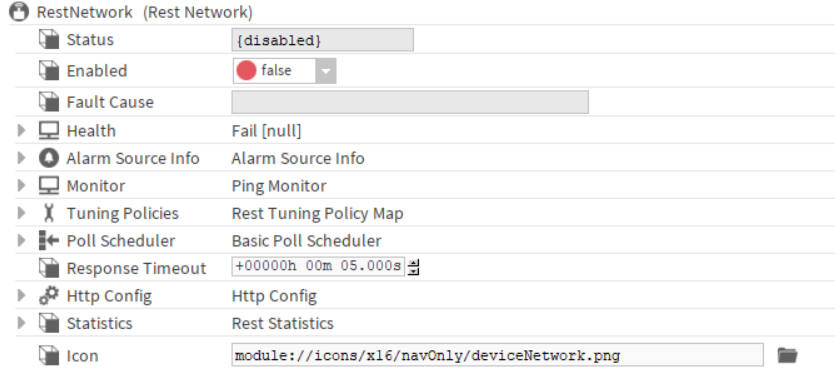
Properties
-
Status: Network status. Can be {ok}, {disabled}, {fault}, {alarm}, {down}, {unackedAlarm}.
-
Enabled: Enable or disable the Network. When disabled, no further communication is scheduled.
-
Fault Cause: Indicates the Network fault reason.
-
Health: Stores the Network status. Indicates if there is an alarm, loss of communication, and the time at which it changed state. This component must change only in line with the Enabled property.
-
Alarm Source Info: Configures the network alarm.
-
Monitor: Configures the network Ping. If a loss of communication is detected, Ping is the only way to wake up the Network. It is not recommended to configure a ping too frequently.
-
Tuning Policies: A network’s Tuning policies holds one or more collections of rules for evaluating both write requests (e.g. to writable proxy points) as well as the acceptable freshness of read requests from polling. In some drivers (such as Bacnet), also supported is association to different poll frequency groups (Slow, Normal, Fast). Tuning policies are important because they can affect the status of the driver’s proxy points.
-
Poll Scheduler: Sets three polling times. The points in the devices will use one of these parameters as the request frequency.
-
Response Timeout: Sets the acceptable timeout for a request. This timeout is only used if a timeout is not entered in Http Config.
It is advisable to enter the Timeout in the Http Config.
-
Http Config: Configures an HTTP request. For more details, see the article on Http Config.
-
Statistics: more information here
-
Icon: Sets the icon for the current component. Selects the icon from the modules only.
Errors
|
Component |
Severity |
Message |
|---|---|---|
|
ArtifactDefinition |
WARNING |
Multiple artifacts are defined with the same name: <name> |
|
RestScheduleImport |
SEVERE |
Error during the execution: <Error message> |
|
RestScheduleDiscoverJob |
JOBLOG.FAILED |
ScheduleSelector is not an object and not an array: <scheduleName> |
|
RestScheduleDiscoverJob |
FINER |
Cannot process on schedule: <error message> |
|
RestProxyExt |
WARNING |
Cannot receive HttpData for <slotpath> : <faultCause> |
|
HttpComm |
WARNING |
**** Received message with an exception: <exception message> |
|
HttpCommTransactionManager |
WARNING |
CommTransactionManager.getCommTransaction All transactions are used. Number checked is: <number> |
|
WattSenseRestScheduleExportExt |
WARNING |
Cannot process day <scheduleName> : <error message> |
|
WattSenseRestScheduleExportExt |
WARNING |
The DayProperties map of the sibling WattSenseRestScheduleImportExt doesn't cover all the days of the week |
|
WattSenseRestScheduleImportExt |
WARNING |
Cannot process <day> : <error message> |
|
EnlightedAuthentication |
WARNING |
Cannot set the Authorization: <error message> |
|
CustomCredentials |
WARNING |
Cannot set the Authorization: <error message> |
|
JWTAuthentication |
WARNING |
Cannot get the access token: <error message> |
|
JWTAuthentication |
WARNING |
Not authenticated |
|
JWTAuthentication |
WARNING |
Cannot refresh token <error message> |
|
OAuth2Credentials |
WARNING |
The Parent RestNetwork is disabled, the access token won't be refreshed |
|
OAuth2Credentials |
WARNING |
Cannot set the Authorization: <error message> |
|
HttpRequest |
WARNING |
Cannot convert content body for the <name> key: <error message>" |