
Summary
This block is used to set an existing PxView to a component. It doesn't create the px but set an existing px as a view to a component. It's usually intended to apply a relative px to a component.
Implementation
-
Drag and drop the block from the palette
-
Link the "execute" action from the "executed" topic of the previous bloc
Example
This block will set the existing px (file:^px/sources/command.px) as a view to the parent of the origin (a point).
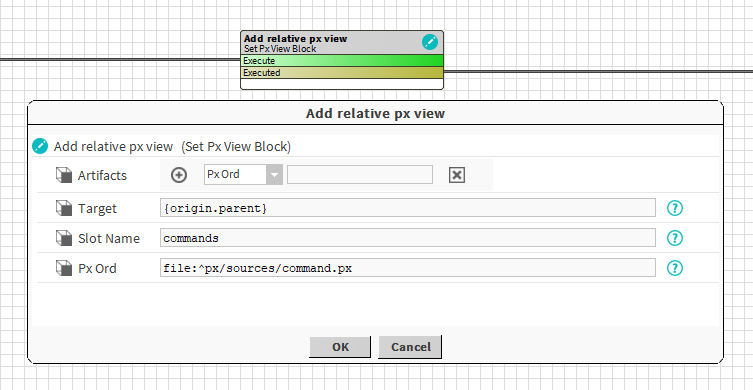
Properties
-
Artifacts: Artifacts created by this block
-
PxOrd: ord of the selected px . Ex: file:^px/sources/command.px
-
PxView: the existing px
-
-
Target: SFormat to define the component that will get the new view. Ex: a point -> {origin.parent}
-
SlotName: SFormat to define the name of the pxView slot to add. Ex: view or commands
-
PxOrd: Ord to the existing px. Ex: file:^px/sources/command.px
Behavior: DO
It creates a PxView slot on the target and set the given px.
Behavior: UNDO
It deletes the PxView slot on the target but doesn't delete the existing px file.