
Summary
This block is used to divide a strategy into several flows depending on a condition based on the type of a component.Only one flow will be executed.
Implementation
-
Drag and drop the block from the palette
-
Link the "execute" action from the "executed" topic of the previous block
-
Click right and trigger the action SetCaseCount. Define the number of cases you want to define.
-
Link topics "DefaultTopic" and "topicX" to block(s) to execute depending the case
Example
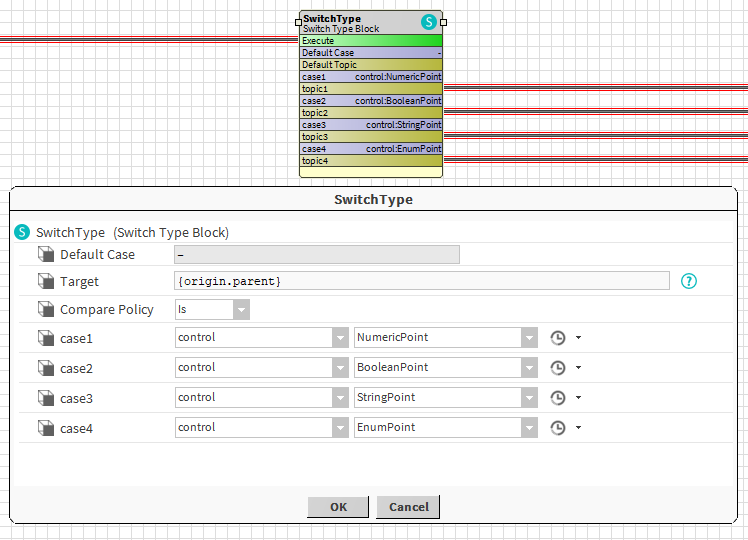
In the following example, the block checks the type of the parent of the origin, whether it's a NumericPoint, a BooleanPoint etc.
Properties
-
Target: SFormat to define a component. Its type will be compared to the following values.
-
ComparePolicy { Is, Equals }: To define the way the target type will be compared to listed types.
-
Is: The target's type should be the described type or a "child" of this type. Ex: Case 2: the target could be a BooleanPoint or a BooleanWritable
-
Equals: The target's type should be exactly the described type. Ex: Case 2: the target should be a BooleanPoint. A BooleanWritable won't satisfy the condition
-
-
DefaultCase: If no case is equal to the parameter.
-
CaseX: Possible values for the parameter.
Actions
-
SetCaseCount: To set the count of cases to handle. The default one is not taken into account.
Behavior: DO & UNDO
The topic of the only valid case will be triggered. Others won't.