
Description
This block is used to export data into a json format.
Implementation
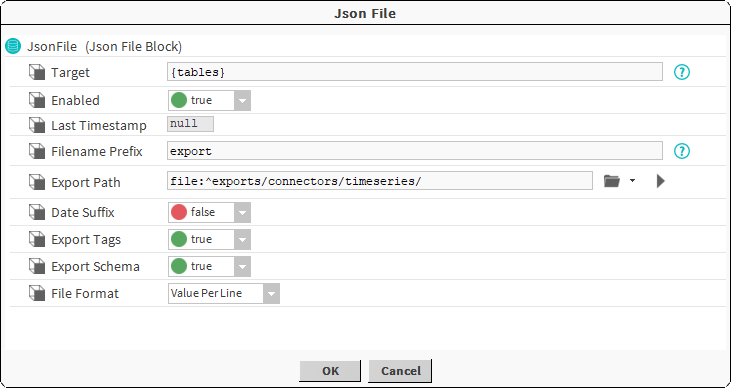
Properties
-
Target: The tables to export
-
Enabled: Enables or disabled the export
-
LastTimestamp: Date and hour of the last export
-
FilenamePrefix: Prefix that will be added to the name of the exported file
-
ExportPath: The path where the file will be created.
-
DateSuffix: Add today's suffix to the file name.
-
ExportTags: Add the tags associated to the history in the file.
-
ExportSchema: If true the file schema will be exported.
-
FileFormat: The format to be used:
-
Value Per line: each line will represent a value in json format, strongly recommended for large exports.
{"sourceId":"e0S7HIMtF8S1REJIKgvyJ","testBool":false, ... , "status":"{ok}"} {"sourceId":"e0S7HIMtF8S1REJIKgvyJ","testBool":true, ... , "status":"{down}"} ...
-
Json Array: The whole data will be exported in a single json array, not recommended for large exports.
{
	"schema": {...}
	"data": {
		{"sourceId":"e0S7HIMtF8S1REJIKgvyJ","testBool":false, ... , "status":"{ok}"}
		{"sourceId":"e0S7HIMtF8S1REJIKgvyJ","testBool":true, ... , "status":"{down}"}
	}
}
-
Do not change the ExportTags value once the header has been written in the file. The new lines written will probably not match the header previously written
Topics
-
Report: used to send data as a niagara report to any recipient that supports a report for input.