
Summary
The RestSSEQuery is a component that creates a socket to receive automatic updates from a server running the Socket.IO library.
When the socket is successfully connected and listening, the data is then propagated to the points in the SocketIoQuery
Implementation
To create a SocketIoQuery, simply drag the component from the palette or use the Rest Device Manager to add a new SocketIoQuery.
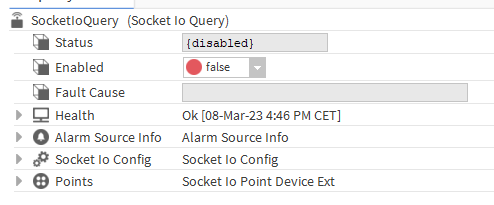
-
Using the SocketIoConfig, set the update and subscribe topics to connect to the server
-
Enable the SocketIoQuery (and its parent Network if it's not already done).
-
When the status of component is not disabled anymore, it will automatically try to establish the connection, otherwise you can trigger the Connect action.
Properties
-
Status: SocketIoQuery status. Can be {ok}, {disabled}, {fault}, {alarm}, {down}, {unackedAlarm}.
-
Enabled: Enables or disables SocketIoQuery . If disabled, this SocketIoQuery does not communicate.
-
Fault Cause: Indicates the SocketIoQuery fault reason.
-
Health: Stores the SocketIoQuery status. Indicates if there is an alarm, loss of communication
-
Alarm Source Info: Configures the SocketIoQuery alarm.
-
Socket Io Config: Configures the socket. For more details, see the article SocketIo Config
-
Points: Container for control points. All checkpoints have a SocketIoPointProxyExt to manage their communication.
Actions
-
Ping: The action tests if the socket is properly connected
-
Connect: connects the socket
-
Disconnect: disconnects the socket
-
Subscribe: sends the contents of subscription payload to the subscription topic in the server. Both of these are set in the Socket Io Config