
Summary
The RestSSEQuery is a component that creates a client to receive automatic updates from a server via an HTTP connection. It re-uses all the configurations from the RestNetwork for it to create an HTTP connection.
When the client is successfuly created, the data is then propagated to the points in the RestQuery.
From a Networks perspective, RestSSEQuery is the equivalent of a Device in Niagara.
Implementation
To create a RestSSEQuery, simply drag the component from the palette or use the Rest Device Manager to add a new RestSSEQuery.
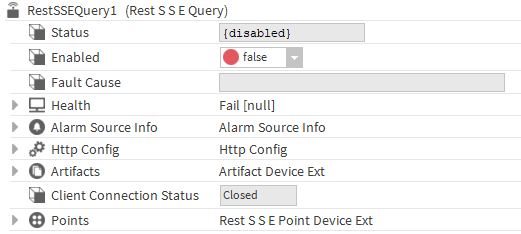
-
Using the HttpConfig, create the request which will subscribe to the server.
-
Enable the RestSSEQuery (and its parent Network if it's not already done).
-
When the status of component is not disabled anymore, it will automatically try to establish the connection, otherwise you can trigger the Connect action.
-
The Client Connection Status will display 'Connecting' and if the client receives an answer, the Client Connection Status will display 'Connected'.
Properties
-
Status: RestSSEQuery status. Can be {ok}, {disabled}, {fault}, {alarm}, {down}, {unackedAlarm}.
-
Enabled: Enables or disables RestSSEQuery. If disabled, this RestSSEQuery does not communicate.
-
Fault Cause: Indicates the RestSSEQuery fault reason.
-
Health: Stores the RestSSEQuery status. Indicates if there is an alarm, loss of communication and the time at which it changed state.
-
Alarm Source Info: Configures the RestSSEQuery alarm.
-
Http Config: Configures the HTTP request. For more details, see the article Http Config.
-
Artifacts: Container for ArtifactDefinition.
-
ClientConnectionStatus: The status of the connection. Can be Closed, Connecting or Connected
-
Points: Container for control points. All checkpoints have a RestSSEPointProxyExt to manage their communication.
Actions
-
Ping: The action tests the connection based on the HTTP request create through the entire Http Config between the RestNetwork and the RestQuery where the action originates. The request is not sent and the points not polled
-
Connect: Establish the connection to the server
-
Disconnect: Close the connection to the server