
Summary
A Strategy is a workflow made of blocks that can be executed to automate every task such as:
-
Add and set components to create or enhance logic
-
Set parameters
-
Create px views
-
Add some widgets in views
-
Invoke actions
-
Process alarms
-
Process histories
-
...
A strategy is triggered based on changes in the model and a source (a component that contains an InfoSource). When you create/edit/delete a Node, one or more strategies can be executed to automate some tasks (create a view on a building for example).
Strategies can also be used in a macro style to handle repetitive operations when you record a set of operations and replay the sequence on other targets (organize a wiresheet, create logics inside devices already deployed...)
Implementation
-
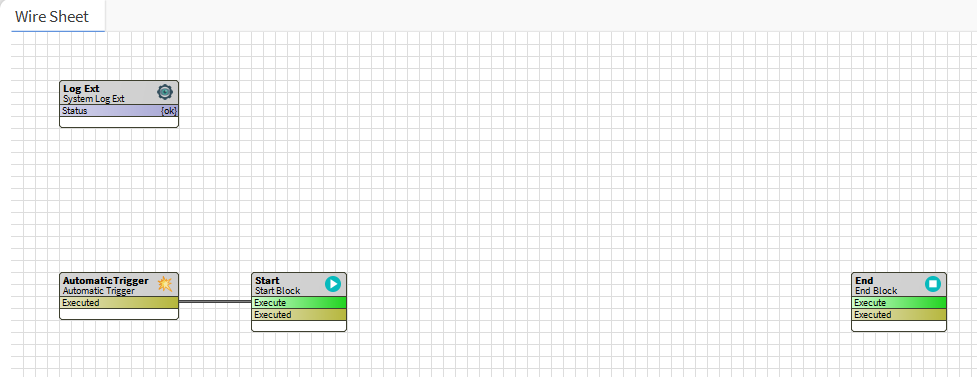
Drag and drop a strategy from the palette or create a new one via the manager on the strategies folder (BtibService > StrategyFolder)
-
Some details about the components always present in a strategy
-
: Used to override the strategies folder LogExt (that will be used by default for all strategies)
-
: To define the strategy execution (automatically, at regular intervals, manually...)
-
Start: The first block of the process. Other blocks should be added after this one. Only one Start block is allowed
-
End: The last block of the process. Every chain of blocks should be linked to this block to be executed. Only one End block is allowed
-
Properties
-
Enabled: Enables or disables the strategy.
-
CreatesTraces: Enables or disables the creation of traces. Traces are used in some block to undo the done task.
Creation
-
Choose the trigger according to your needs:
-
AutomaticTrigger: to execute automatically strategies on Node and InfoSource's actions (initialize, disable and clean)
-
MacroTrigger: to execute macros manually from a selection. This trigger is actually automatically added when a macro is recorded.
-
-
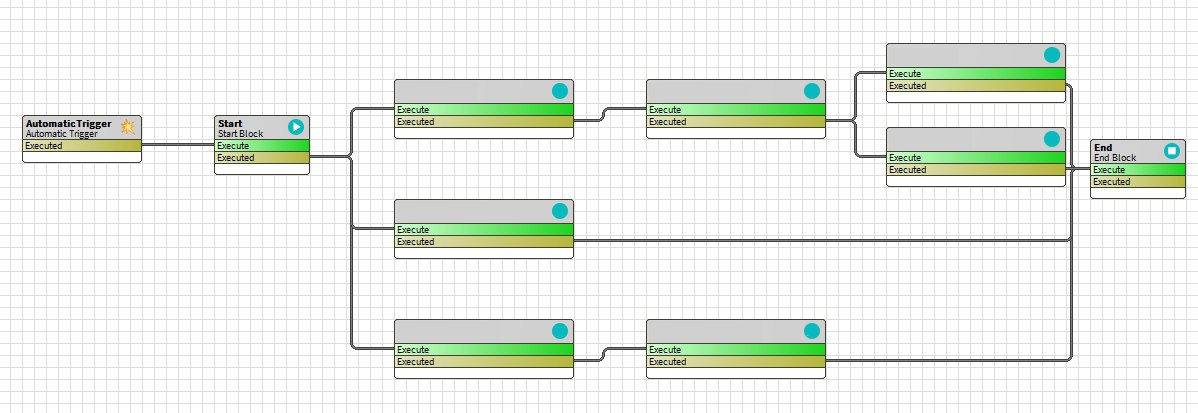
Blocks Every block has one action and one topic:
-
The "executed" topic should be linked to one or more "execute" actions to create a workflow. Blocks will be executed in the blocks order
-
All chains have to be linked from Start to End
-
Undo
Some blocks have the possibility to undo the task previously done (in the documentation, those blocks have a "Behavior: UNDO" section)
The Undo in a block will be triggered if:
-
the selection is changed
-
the strategy is disabled or removed
-
the link going from the executed slot in the start block is removed and the strategy is triggered
-
an if block is added before the block
Common issues
-
My strategy is not executed after an initialization of a node or InfoSource
-
: ensure that an automatic trigger is linked to the start block
-
: ensure that the selection is active and selects the targeted node or InfoSource
-
: logs can be checked (Workbench > Logs Console) to see errors
-
Cache: some caches can be manually refreshed
-
Selection: BtibService > SelectionFolder > inoke action "RefreshCache"
-
Strategy: BtibService > StrategyFolder > invoke action "RefreshCache"
-
-
-
My block has not been executed
-
My block doesn't work as expected
-
I don't know if my strategy is still running
-
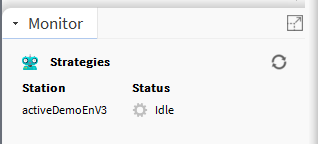
Sidebar: a sidebar is available to monitor the status of the strategies' engine. Status can be:
-
Idle: all the strategies have been executed
-
Running: some strategies are still processing
-
-
Sidebar can be displayed via Workbench > Window > Side Bars > Monitor
-