
Description
This block is used to export data into a csv format.
Implementation
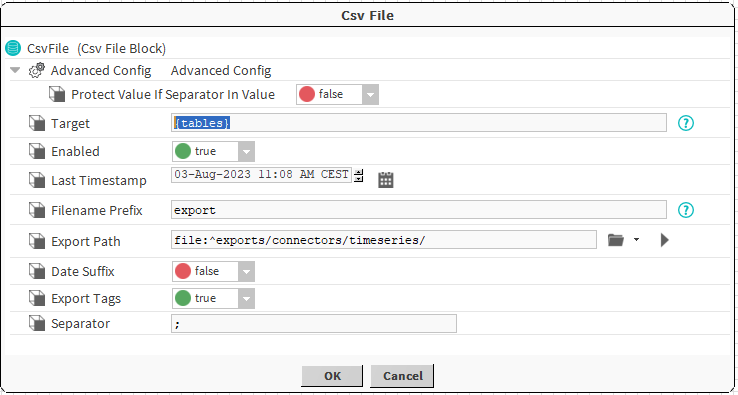
Properties
-
Target: The tables to export
-
Enabled: Enables or disabled the export
-
LastTimestamp: Date and hour of the last export
-
FilenamePrefix: Prefix that will be added to the name of the exported file.
-
ExportPath: The path where the file will be created.
-
DateSuffix: Add current date and time suffix to the file name.
-
ExportTags: Add the associated tags to the history in the file.
-
Separator: The file separator to be used for the csv.
Do not change the ExportTags value once the header has been written in the file. The new lines written will probably not match the header previously written
Advanced Properties
-
ProtectValueIfSeparatorInValue: If there are several columns defined, and they are separated by the value defined in the Separator slot, turning this option to true will wrap the columns in double quotes.
-
Example: if we have a Rename Column block with a column name of "Date;Counter;Value;Unit", and then in our CsvFileBlock we have set our Separator to ";", if ProtectValueIfSeparatorInValue is true and we have the value of "22/08/2023", "1", "3", and "m", then in our exported file we will see a result like Station1/StringWritable"22/08/2023;1;3;m". Turning ProtectValueIfSeparatorInValue off will remove the doubles quotes, which is probably what you want to do if you want to export the results to a spreadsheet program
-
Topics
-
Report: used to send data as a niagara report to any recipient that supports a report for input.