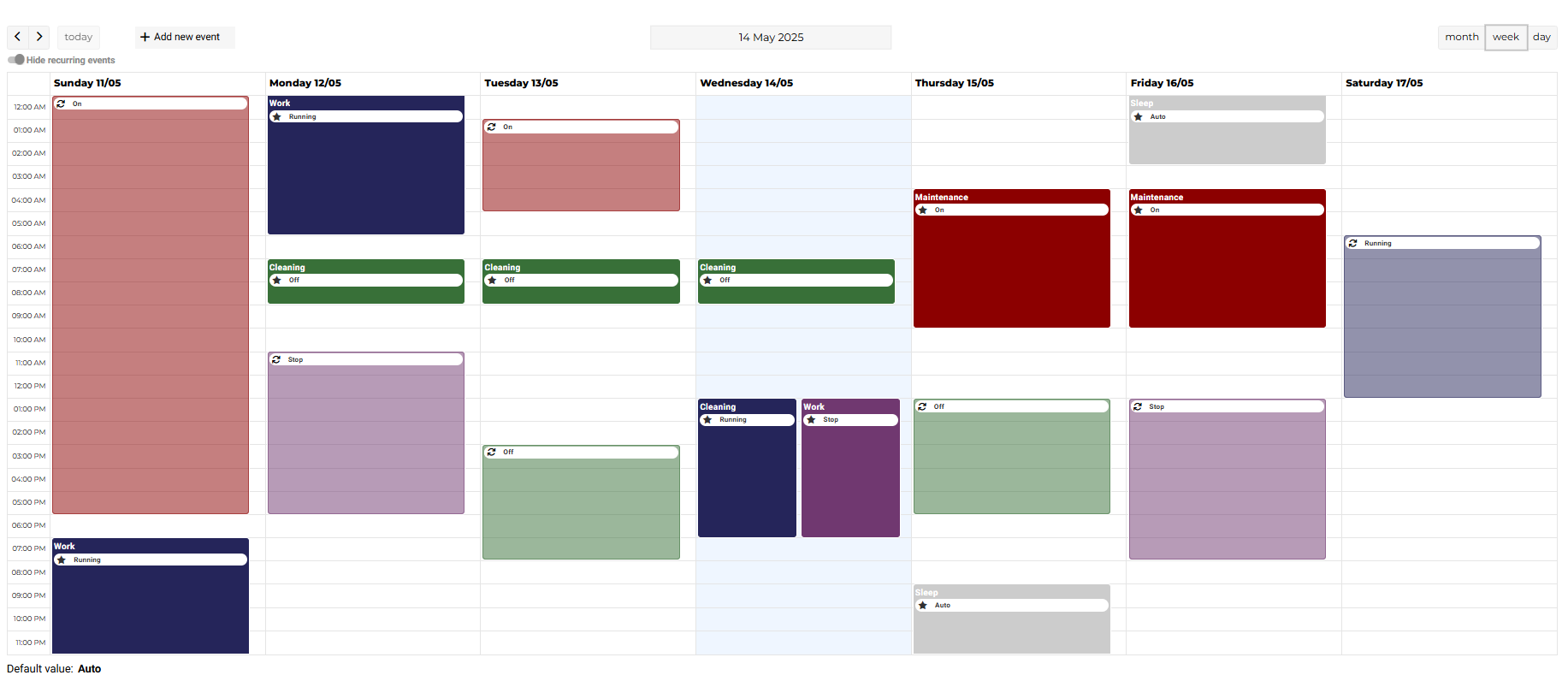
EnhancedScheduler is a new, innovative view that enhances event management in Niagara. By integrating the FullCalendar library, it provides an intuitive interface for easily creating and managing recurring and special events.
🛠️ Setup
In the Setup section, we explain how to configure a schedule to use the EnhancedScheduler view.
🟢 Key Features
🎯 Unified Event Management
Unlike Niagara's standard view, EnhancedScheduler allows users to view and manage all recurring and special events in one place, significantly simplifying planning.
✏️ Event Creation/Editing
Users can now create or edit events by clicking and dragging directly on the calendar.
🗓️ New Event
Introduction of "MultiDays", allowing the creation of events spanning multiple days. This type complements the existing Date and DateRange types.
Additionally, you can now create multiple events with the same name, making it easier to manage and organize recurring activities or related events.
📋 Event Variations in EnhancedScheduler
The EnhancedScheduler allows you to create a variety of special events similar to the Niagara system. Below is a table listing all possible variations of events you can create with our view.
🔗 Reference Events in EnhancedScheduler
The EnhancedScheduler now allows you to create Reference Events directly from its interface. By selecting the Calendar option and choosing an existing CalendarSchedule, you can dynamically link and manage events across schedules with ease.
🖥️ EnhancedScheduler Card
The EnhancedScheduler Card offers the possibility to integrate EnhancedScheduler into a Flex View. You can customize its appearance and behavior by configuring its properties, such as colors, directly in the Default Theme or Dark Theme via the EnhancedSchedulerExt extension.
✨ Color Customization in PX View
Customize card colors directly from the PX view via the properties panel.
🔍 Flexible Navigation
EnhancedScheduler offers various calendar views (day, week, month) for optimal event management, along with intuitive tools for easy navigation.
🖥️ Toggle Recurring Events
EnhancedScheduler includes a toggle button that allows users to easily show or hide recurring events. This feature helps in decluttering the calendar view and focusing on special or one-time events as needed.
⚙️ Configuration
It is possible to customize certain facets of the EnhancedScheduler via the AX property style sheet.
There is also a Language Adaptation feature, as well as the possibility of modifying the user's date format in the user parameters.
📊 Niagara vs. EnhancedScheduler
Feature comparison between Niagara's Schedule view and the EnhancedScheduler interface.
⚠️ Current Limitations
📅 Unsupported Event Types
Types such as "Week And Day" and "Custom" are not yet supported.
❗ Unsupported Event Combinations
Some combinations may be blocked and return an error message if not handled by the view.
📝 Editing MultiDays Events
MultiDays events can only be edited from the end date. Long events may result in slow creation/editing due to per-day requests.
🌐 Lexicon Behavior in the Workbench
Since Niagara 4.14, the language of lexicons depends on the user's language (UserService) instead of the Workbench locale.
⚠️ Default Language Fallback
If no language is set for the user in Niagara 4.14, the system defaults to French.
EnhancedScheduler transforms event management by making planning more accessible and seamless, while offering an enriched user experience.