
Summary
This block is used to change the value of a slot in a target.
Implementation
-
Drag and drop the block from the palette
-
Link the "execute" action from the "executed" topic of the previous block
Example
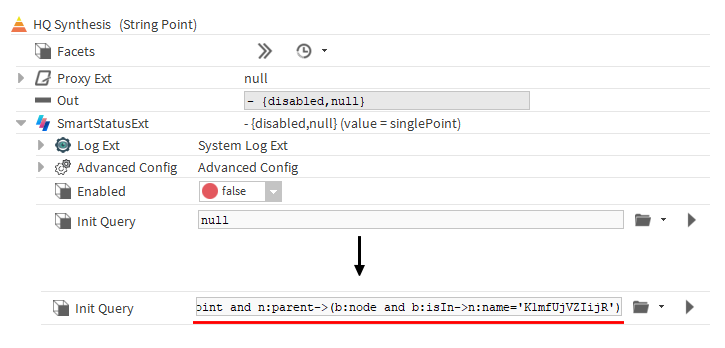
A SetSlot is used to change the property "Init Query" of a synthesis of a point located in a building. All properties could be changed in the same way.
Properties
-
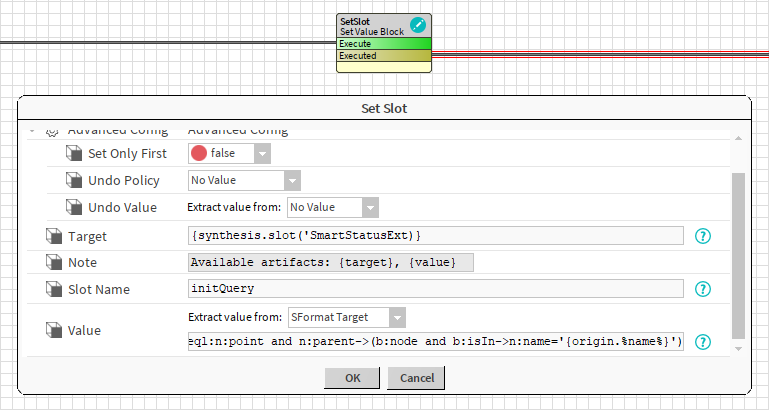
Target: SFormat to define the component whose property has to be changed. Ex: the slot named SmartStatusExt of an artifact named synthesis created by a previous block
-
Note: Available artifacts
-
SlotName: SFormat to define the name of the slot to change. Ex: initQuery (it's a frozen property of the SmartStatusExt)
-
Value: To define the new value of the slot. See . Ex: an ord is created from SFormat. Some value relative to the origin of the event can be injected (here the name of the node is injected in the query)
Advanced Config
-
SetOnlyFirst: If set to true, the block will only do the operation at its first execution (If you rerun the strategy, the operation won't be done again). If set to false, the block will always try to do the operation.
-
UndoPolicy: Defines what to do in the UNDO case.
-
No value: Does nothing
-
Set Value: Sets the value from the UndoValue
-
Remove Value: Removes the value
-
-
UndoValue: If desired, the block can undo its operations. The old value of the slot is not saved but a new value can be defined and set in case of an undo. See .Ex: Set a default value for the initQuery
Behavior: DO
The value of a slot is updated. It won't work if the value to change is a component (in this case you should rather use an AddComponent).
Behavior: UNDO
By default, the slot stays unchanged when the block is undone. But the properties "Undo Policy" and "Undo Value" can be changed.