Now you know how to modify a macro and even how to add new blocks. Let's see in details a few concepts if you want to master the macros.
Concepts
Macro are actually a derivative of Strategy with the purpose to being used independently from any station. Strategies are the engine of the Active-Framework to automate most of the programming to create appliances. There a lot more available features through the strategies because they rely in the station and not in the Workbench as for macros. If you use Active-Framework you can create more complex macros.
However all the concepts behind are quite identical.
Artifacts
We've seen it before, artifacts allow you to reuse a component added by a previous block and becomes the new base for your modifications. If an artifact is available, you will find at the top of the block a slot called "Artifacts".

To use an artifact in a following block, put it into curly brackets like {artifacts1}

Resources
You may have noticed on the "Add average" block that was created in the previous step, there was a resource involved in the value slot.
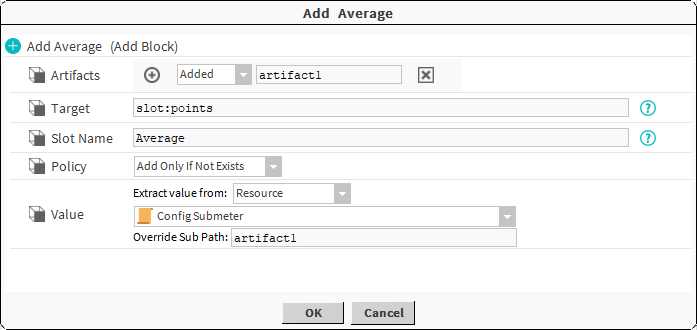
A resource is simply a component in a bog file. When the average block was added, the system recorded it and put the average block into a resource, in order to be able to add it after to other devices.
It's powerful because it means you can deploy anything by a macro: an existing logic, a configured device etc.
Resources are located in the third tab we haven't explored yet in the Active Pro Macro Manager
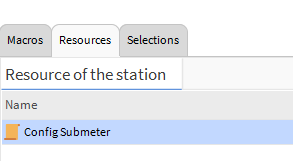
If you open it through the Ax Property Sheet, you will recognize the average component
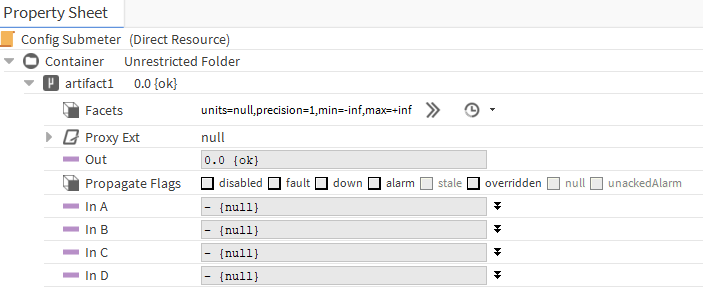
You can modify this resource or create a new Resource from btibMacro palette.
And in the block where you need it, select Extract value from" "Resource" and select your resource.
SFormat
SFormat stands for SuperFormat. It's an extended BFormat aimed to provide additional features (a lot more).
You can navigate through components & relations, read tags, modify text (escape, substring, etc), browse arrays....
A SFormat is defined by a chain of characters between curly brackets { } and is a succession of functions used to build the result. Unlike the BFormat, the SFormat result can be a component or any object (while BFormat can only result in a String).
Example: {parent.relations('out','b:isIn').item(1).%displayName%} -> Take the parent, then follow its outbound relations b:isIn, then take the second element (because there might be several relations) and then apply the BFormat to get the displayName.
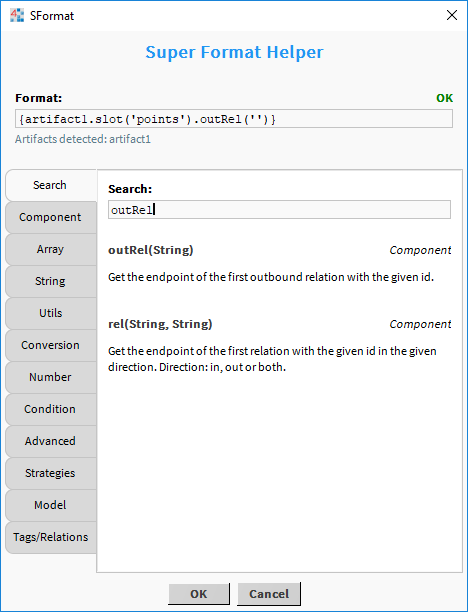
You will recognize SFormat with the interrogative point at the end of the field, If you click on it, a help popup will appear.

You can use the popup to pre-fill your SFormat (click on the different functions) and have the documentation on it.
List of available blocks
If you use only Active-Pro, without Active-Framework in your station (a BtibService running in the station), you are restricted to the following blocks (see their respective documentation):
If you use Active-Framework you can use all the btibStrategy blocks
Practice macros
You can watch this e-learning course to practice