
Summary
This block is used to filter the elements of an artifact based on a condition. The filtered artifact will then be used in the following blocks.
Implementation
-
Drag and drop the block from the palette
-
Link the "execute" action from the "executed" topic of the previous block
Example
This block is based on a previous artifacts that retrieved some points. It will filter the points to keep only the ones of BooleanWritable type.
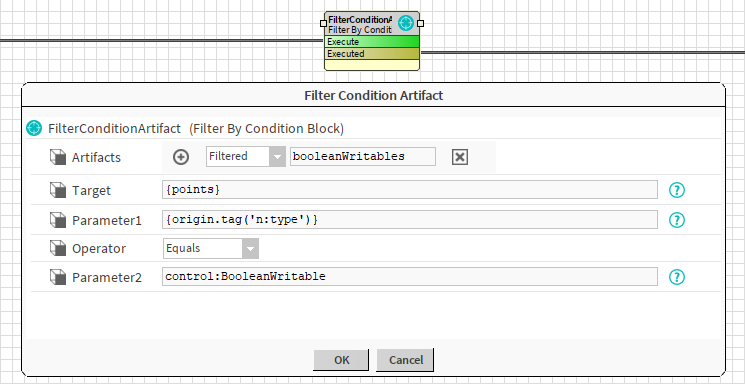
Properties
-
Artifacts: Artifacts created by this block. Be careful, the artifact is an array, you will need sometimes to use .first in a SFormat to use it.
-
Target: SFormat to define the target (queries, ord, artifacts etc.)
-
Parameter1: SFormat to define the first parameter of the condition.
-
Operator { Exists, Equals, NotEquals, Like }: To define how the first and the second parameter should be compared. Both parameters are reduced as a String before being compared.
-
Exists: Checks that the value defined in the first parameter exists. The second parameter is useless in this case
-
Equals: Checks that both parameters are equal
-
NotEquals: Checks that both parameters are different
-
Like: Checks that the first parameter is like a pattern described in the second parameter. Wildcards * can be used (it's not a regex as with NEQL queries).
-
-
Parameter2: SFormat to define the second parameter of the condition.
Behavior: DO & UNDO
An artifact will be created.