
Summary
The Password Credentials Authentication allows connection to a Service through the Password grant.
This component will fetch the token and add the required Authorization Header to the requests created by the RestNetwork.
This component expects a response with a JSON body. The JSON must at least contain the "access_token" key with a String value and the "expires_in" key with a numeric value.
Once the time given by the response through the "expires_in" key has elapsed, this component will refresh the token.
If this component was given a response with a "refresh_token" key with a numeric value, the token will be refreshed using the Refresh Token grant otherwise a new request will be sent.
Implementation
-
Drag the authentication from the palette into the AuthenticationContainer of the Http Config.
-
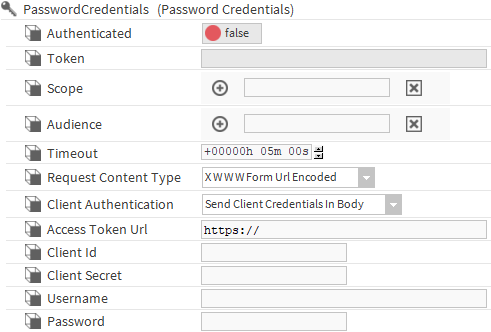
Fill the fields.
-
As soon as the RestNetwork will try to send a request, the component will fetch the token and add it to the request. You can also trigger the "refreshToken" Action.
-
The authenticated field should display true if everything went well, check the station console otherwise.
Only one authentication per AuthenticationContainer is possible.
Properties
-
Authenticated: If true, indicates that an AccessToken has been successfully fetched.
-
Token: Displays the first ten letters of the token if a token was successfully fetched.
-
Scope: (optional) Scopes for the client credentials grant. It may have multiple values.
-
Audience: (optional) Audiences for the client credentials grant. It may have multiple values.
-
Timeout: The timeout on the request that will fetch the token.
-
RequestContentType: The content type of the request that will be sent to fetch the token. The standard states that x-www-form-urlencoded should be used, but many API use JSON instead.
-
ClientAuthentication: Determines whether the clientId and clientSecret are sent through the body or through a Basic auth header.
-
AccessTokenUrl: The URL to get the token.
-
ClientId: Field containing the ClientId. It is encrypted and cannot be copied with the component.
-
ClientSecret: Field containing the ClientSecret. It is encrypted and cannot be copied with the component.
-
Username: Field containing the Username
-
Password: Field containing the Password. It is encrypted and cannot be copied with the component.
Actions:
-
RefreshToken: Refresh the token