
Now your stations should be fully prepared to propagate their model between each other.
Presentation
We will try to propagate a simple Node. Here's a check list of what's needed for its propagation to work:
-
Have at least two stations which can ping each other, with a SUPERVISOR/SUBORDINATE role. ALL stations must have the same parent Aspect and Node Definition.
-
The ModelDeviceExt must be enabled in the SOURCE statione.
-
Have the same parent Aspect with the SyncEnabled slot set to true in the SOURCE station.
-
Have the same Node Definition with the correct SyncUp/SyncDown in the SOURCE station.
Use the Propagation Diagnostic to check that everything is correctly configured.
Now simply trigger the "Synchonization" action in a Node (in the correct Aspect and Node Definition).
If the target station doesn't have a Node with the same Id, the Node will be created, otherwise, the data in the Node will be updated.
Example
Let's synchronize the "Ground Floor" in the "Location" Aspect and the "Floor" Node Definition. Now that the complicated part is done, simply trigger the "Synchronize" action on the Node
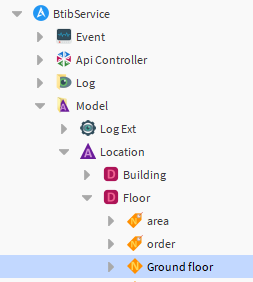
If everything went fine, you should find the Ground Floor Node in the target station.
Otherwise, use the following tools to follow the propagation evolution.
Follow the propagation evolution
AspectSyncTask
You can see the evolution of a Propagation in the associated AspectSyncTask in the Niagara Station in the Niagara Network
In our case, "Ground Floor" is in the "Location" Aspect, so we can follow the Propagation in the "Location" AspectSyncTask
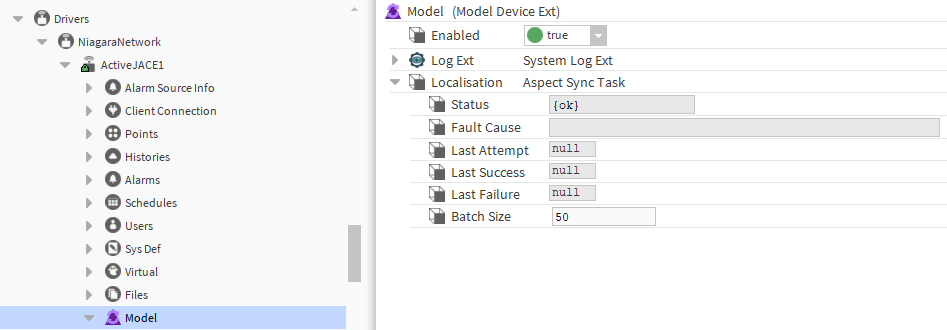
A brand new AspectSyncTask will have a null LastSucces, LastAttempt and LastFailure value.
The easiest way to propagate a Node is to trigger the "Synchronize" Action. The first observable modification will be the update of the LastAttempt slot:
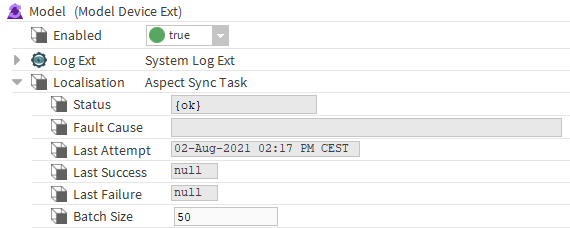
If the LastAttempt isn't updated, check your SOURCE station configuration and its status.
It includes:
-
the ModelDeviceExt status
-
The station status
-
The station SysDef status
-
The station SysDef Role Manager (it must be ok and synced)
There are two results to a propagation:
-
Success:
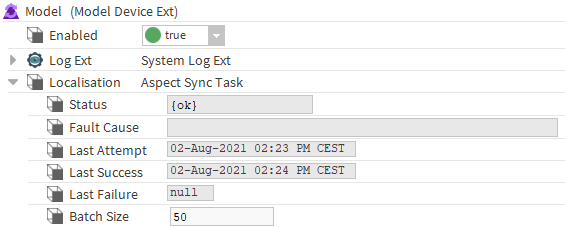
The LastSuccess slot is updated and in the target station, a copy of "Ground Floor" will be created in the Building Definition Node.
If the LastSucces is updated but no result can be seen in the target station, check your TARGET station configuration.
Sending a request to a JACE can be a bit slow. Wait for the LastSuccess slot to update before checking for any result in the target station.
-
Failure:
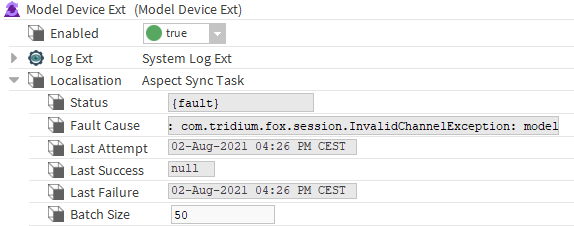
The Status and FaultCause are updated. Check the FaultCause for a better understanding of the failure. In the example above the target station's propagation wasn't initialized.
Want to see more?
We mainly talked about the Supervisor and the Jace1 station. But it's also possible to propagate Node between more than two stations:
If you configure the Jace2 station in the same way as the Jace1, synchronizing the "NewNode" in the Supervisor station will create a new node in Jace1 and Jace2.
Next Step
Step 3 Configure the model propagation triggers