
Previously, we have only seen the "Synchronize" action and its result. Let's get deeper.
There are many ways to trigger a propagation. We'll see which triggers are available depending on your Aspect's advanced configuration.
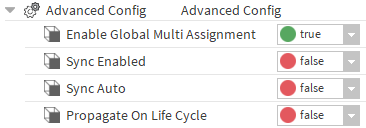
In the 47.3 version, those three slots aren't used but will be implemented soon.
Currently, only the Synchronize and SetAsLocal triggers work
Sync Enabled only
Enabling the SyncEnable, will allow you to propagate through
-
the "Synchronize" actions in the Aspects, Node Definitions and Nodes
-
the "Set As Local" action in the Nodes.
"Synchronize" action
Trigger
Since the 46.16 version, the Aspects, NodeDefinitions and Nodes have a "Synchronize" action.
-
-
On an Aspect or a NodeDefinition, triggering this action will synchronize their children Nodes. Each Node will be exported with its descendants (Nodes with the b:isIn relation).
-
-
-
On a Node, it will synchronize the Node.
-
Since the 47.3 the Node's descendants aren't propagated anymore
Reminder: a propagation will have no effect on the Aspects nor NodeDefinitions of the target station, they won't be created, deleted or updated => the target station MUST have the correct NodeDefinitions to synchronize your Nodes.
Example: Consider the Node "Le Rabelais" which is inside the "Building" Node Definition which is inside the "Location" Aspect.
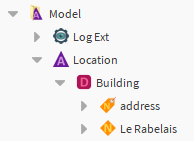
If you want to synchronize this node, the target Station must have the same "Location" Aspect and the same "Building" NodeDefinition.
Result
There are two possibilities depending on the presence or not of the source and the target Nodes
|
source Node: present target Node: present |
The target Node will be updated using the informations in the source Node.
|
|
source Node: present target Node: absent |
A copy of the source Node will be created in the target station (same slot values and if possible, same relations). |
If the action was triggered on a Node Definition or an Aspect, it is possible to "clean" outdated nodes in the target station. An outdated Node is a Node which was previously propagated but doesn't exist in the source station anymore.
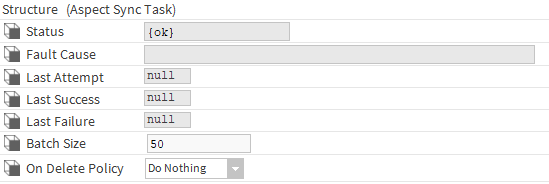
What the clean will do will depend on the "On Delete Policy" in your AspectSyncTask.
|
Do nothing |
- |
|
Disable |
The Disable action will be triggered on the outdated Node |
|
Clean |
The Clean action will be triggered on the outdated Node |
|
Delete |
The Clean action will be triggered on the outdated Node and they will be deleted |
"Set As Local" action
Trigger
Since the 46.16 version, the Nodes have a "Set As Local" action.
Result
In the station the actions was triggered in (the source station), the SourceStation, SyncOriginOrd and b:syncSource slots of the Node will be updated:
-
-
SourceStation: will take the current station's name.
-
SyncOriginOrd: will target the Node in the current station.
-
b:syncSource: will be set to Local.
-
This action will be propagated to the stations which also have the same Node (in the same Aspect and Node Definition),
-
-
SourceStation: will take the name of the source station .
-
SyncOriginOrd: will target the Node in the source station.
-
b:syncSource: will be set to Remote.
-
Sync Auto
In the 47.3 version, those triggers won't result in any propagation
Enabling the SyncAuto, will allow you to propagate through
-
the Node modification
-
the Batch modification
Node Modification
Trigger
In a Node, the modification of a:
-
-
slot containing an "aoo" facet
-
relation which isn't from a nodeTag
-
will trigger a propagation if the Node isn't disabled.
Result
The result is the same as for the "Synchronize" action.
Batch Modification
Trigger
The modification of the model using the
-
-
Node Creator
-
Node Drawer
-
btibApi
-
will also trigger a propagation
Result
The result is the same as for the "Synchronize" action. Due to some limitations, the closest parent containing the modified or created elements will be synchronized.
Example: In the node manager, if you disable some Nodes, the parent Node Definition will be synchronized.
Propagate On Life Cycle
In the 47.3 version, those triggers won't result in any propagation
Enabling the PropagateOnLifeCycle, will allow you to propagate through the
-
Initialize
-
Clean
-
Disable
actions in the Aspects, Node Definitions and Nodes.
The reset Id Action won't be propagated
You can also trigger those actions on multiple elements using the
-
Aspect Manager
-
Definition Manager
-
Node Manager
Initialization
Trigger
An Initialize on any Model Item in the source station.
Result
Triggers the initialize action on the target Model Item in the target station if it exists.
Clean
Trigger
A Clean on any Model Item in the source station.
Result
Triggers the clean action on the target Model Item in the target station if it exists. If the target is a Node, it will be deleted
Disable
Trigger
A Disable on any Model Item in the source station.
Result
Triggers the disable action on the target Model Item in the target station if it exists
The Model Items in the target station are found in different ways:
-
The target Aspect or Node Definition will be the targeted thanks to its name
-
The target Node will be targeted thanks to its id