
Description
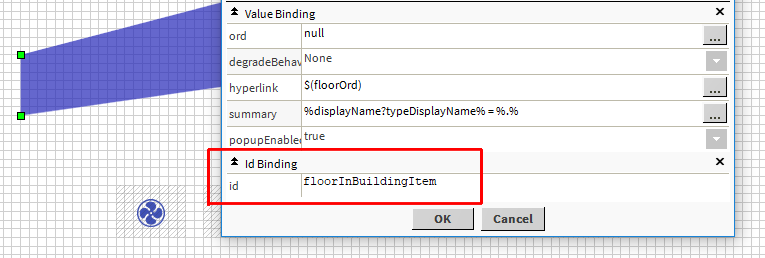
A Widget Resource selects a widget in a px via an id specified in an IdBinding.
A widget should be declared as a Resource in order to be used with strategies. It will make it available as a model in several blocks.
Implementation
-
Drag and drop a WidgetResource from the palette in a ResourceFolder
-
Set the px path where your widget is contained
-
Set the widget id (the id defined in the btibCore:IdBinding of your widget)

Properties
-
ResourceOrd: The ord to access the px containing the desired widget
-
WidgetId: The id specified in an IdBinding added in the widget.
Coming soon
-
When a resource is updated (an image is replaced, a px or a bog is modified...), an action will be available to update strategies that are using this resource.
-
Resources will be able to read files located in the cloud. Ex: https://bso-project.org/resources/AHU_Mask.px