
Summary
The RestHistoryImportExt is used to transform data from an API into Niagara histories
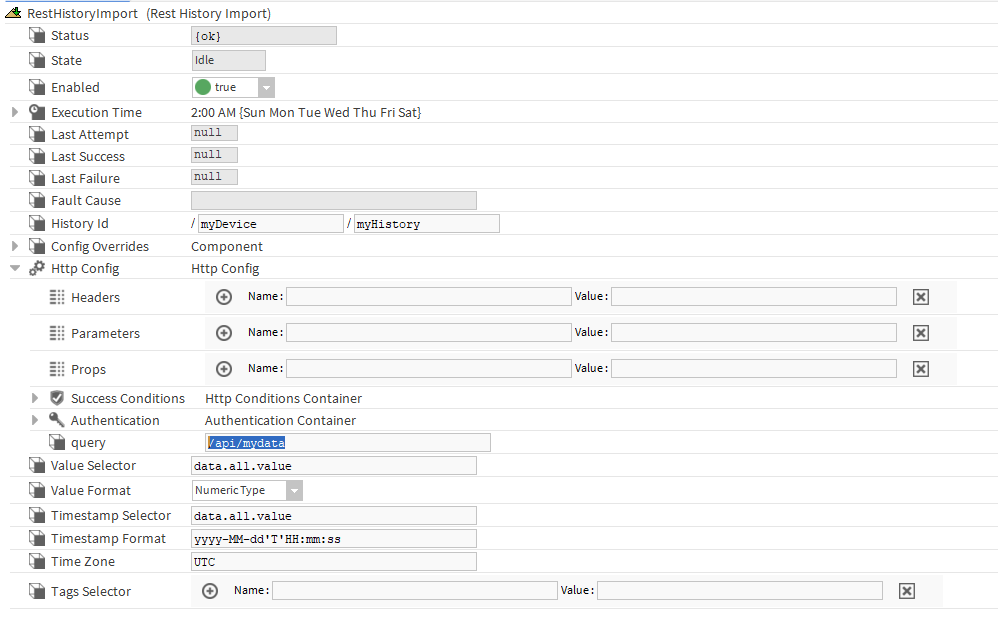
Implementation
-
In the RestHistoryDeviceExt, add a RestHistoryImport from the palette
-
Configure its properties
Properties
-
ExecuteTime: To configure when to pull the values
-
HttpConfig : To configure the Http (Get) request to get the history values. See Http Config
-
ValueSelector: To select the part of the json which contains the history values. It can be an array or an object. This is a JSON Key Selector based on the Http response. For example: data.all.value (in this case: data is a JSON array, all represents all the JSON objects inside that array and value is the JSON field which contains the value in each object of that array)
-
ValueFormat: To select the type of the value (Numeric, String or Boolean)
-
TimestampSelector: To select the part of the json which represents the timestamp. Similar to ValueSelector.
-
TimestampFormat: To define the encoding used for start and end dates. Will be used to convert them in AbsTimes. Special case: it is possible to convert a "date" which is in milliseconds since Epoch, using the "SSSS" (wihout quotes) format
-
TimeZone: To define the timezone given by the API (usually UTC)
-
TagsSelector: To define which tags to create for the history based on the returned JSON.
Actions
-
Execute: To force the import. (It will use the ExecutionTime value in a steady state)
If the ValueFormat is set to Numeric, null values will be converted to Nan.