
Summary
This block is used to create new artifacts from a csv file. This artifact will then be used in the following blocks.
Here is how it works:
-
First a cache of the file is created: The block reads the file and keeps in memory the columns and rows of your file.
-
It creates the parameters column1 to columnX with X the number or columns in the file
-
Then it will iterate on all the rows of your file
-
As soon as the "conditions" slot return true, it will create the artifacts with the values at the current ro
Implementation
-
Drag and drop the block from the palette
-
Link the "execute" action from the "executed" topic of the previous block
Example
Here is the content of a sample file, the first column contains the slotpaths of some points, the second column contains values that we will set on the matching point

Our strategy iterates on the control points of our station

Here in the conditions, we compare {column1} which corresponds to a slotPath to the slotPath of the origin.
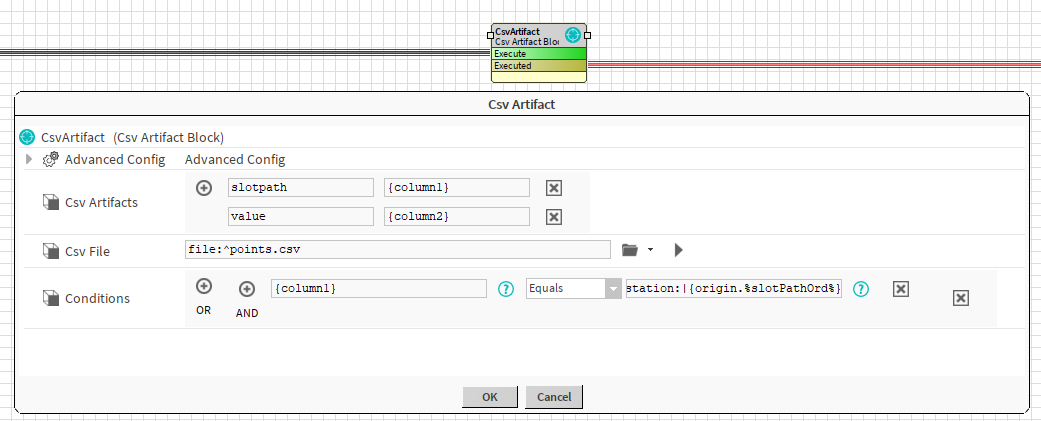
If it matches, a slotpath and a value artifact are created with the values at the matching row.

Properties
-
CsvArtifacts: Artifacts created by this block.
-
CsvFile: Ord to the file from which you want to extract data.
-
Conditions: The condition needed to match a row in your file and create artifacts.
If the conditions are left empty, it considers that you are comparing an empty string to another empty string, which returns true. The block will thus always match the first row
Advanced Properties
-
CsvSeparator: The character used to separate values in your file
Actions
-
RefreshCache: This block creates a cache that will last for 30 minutes, if the content of your file changed of if you put a wrong separator, you will have to refresh the cache.
Behavior: DO & UNDO
An artifact will be created.