
Summary
The IFCModelImporter is used to import a model from an IFC document.
Implementation
-
Drag and drop the component from the palette to an Aspect in the BtibService.
-
Select the IFC file you wish to import.
-
Add an IFCSiteImportParams and as many IFCModelImportParams as needed and configure them
-
Trigger the execute action
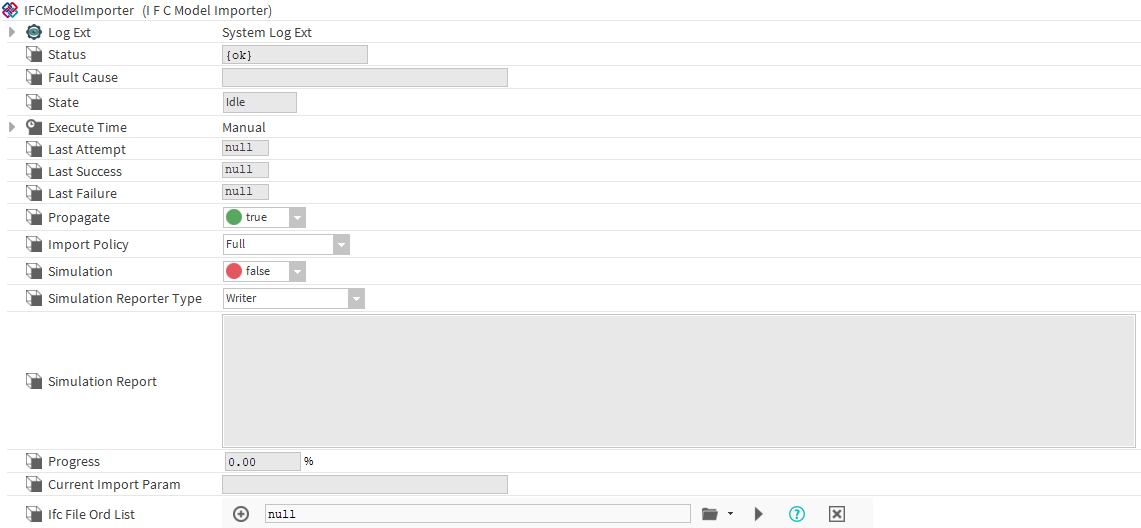
Properties
-
LogExt: Logger
-
Status: Import status
-
Fault Cause: The explanation of a fault cause.
-
State: State of the import, can be idle, pending or in progress
-
ExecutionTime: Component firing the export a topic at configured times
-
Last Attempt: Datetime of the last export attempt.
-
Last Success: Datetime of the last successful export.
-
Last Failure: Datetime of the last failed export.
-
Propagate: Triggers or not a propagation to other connected stations after the import.
-
ImportPolicy: If set to full, the Node will be fully imported (with its values, tags, displayName, it will be initialized etc). If set to importTagsOnly, only the tags will be imported on the existing Nodes and they won't be initialized.
-
Simulation: If set to true, allows to run a simulation of the import. The results will be displayed differently depending on the simulationReporterType value.
-
SimulationReporterType: If set to writer, the result of the simulation will be written in the Simulation Report slot, if it is set to ComponentBuilder, a folder named "simulationReportComponent" will be added to the importer and inside, a list of Components will be added.
-
Progress: Displays the progress of the current import.
-
CurrentImportParam: DIsplays the parameter being currently imported.
-
IfcFileOrdList: List of the paths to the files to import.
Actions
-
Execute: Imports the files.