
Description
This component allows you to connect to Sharepoint.
Implementation
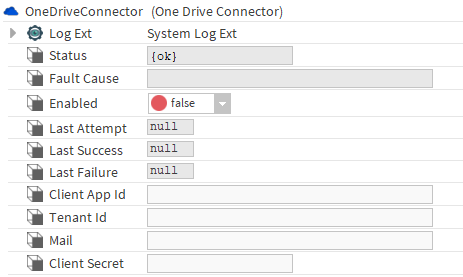
Drag and drop the connector from the btibAzure palette to BtibService > External Connectors > File Connector.
Please be sure to have the rights to get the data from the API, see here for application configuration.
Properties
-
Status: Connection status
-
Fault Cause: The error message status.
-
Enabled: Enable/Disable the component.
-
Last Attempt: Datetime of the last connection attempt.
-
Last Success: Datetime of the last successful attempt
-
Last Failure: Datetime of the last failure attempt.
-
Client App Id: the client application id
-
Tenant Id: the tenant Id of your application
-
Mail: the mail of the user to use for fetching the API
-
Client Secret: the client secret of the user
Actions
-
Ping: Ping the app using the ClientCredential flow.