
Summary
This block is used to organize components in the Wiresheet. Each column contains a type of component (alarm classes, points, recipients, folders, etc.)
Implementation
-
Drag and drop the block from the palette
-
Link the "execute" action from the "executed" topic of the previous block
-
Set the desired count of columns, press OK to valid
-
Re-open the popup: x columns appear
-
Select each column associated type
Example
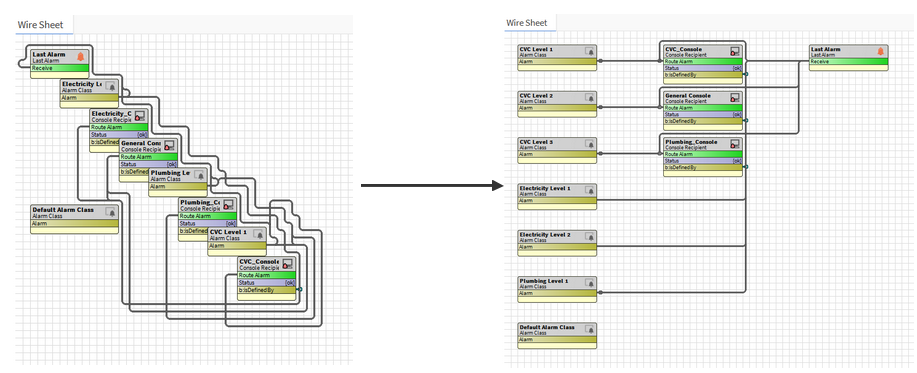
This blocks organizes the Wiresheet according columns (depending on component types). Ex: Alarm Classes first, then Consoles, then Last Alarm.
Properties
-
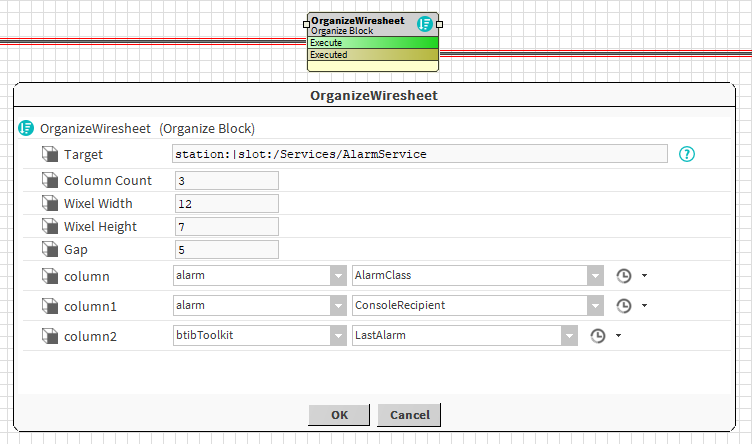
Target: SFormat to define the component whose Wiresheet should be organized. Ex: the AlarmService
-
ColumnCount: Number of columns to parameter
-
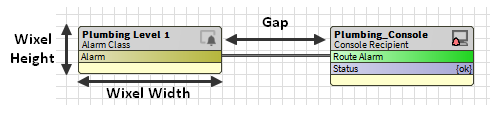
WixelWidth: See picture below
-
WixelHeight: See picture below
-
Gap: See picture below
-
columnX: Type to select associated to the column. Every component of a column should be of the same type. Note that you can choose a parent type such as ControlPoint if you want to put NumericPoint, BooleanPoint etc. in the same column.
Behavior: DO
The wiresheet is organized according to the provided columns.
Behavior: UNDO
The wiresheet is reorganized when strategy is undone too.