
Summary
This block is used to set a slot value in a widget such as background, text etc.
Implementation
-
Drag and drop the block from the palette
-
Link the "execute" action from the "executed" topic of the previous bloc
Example
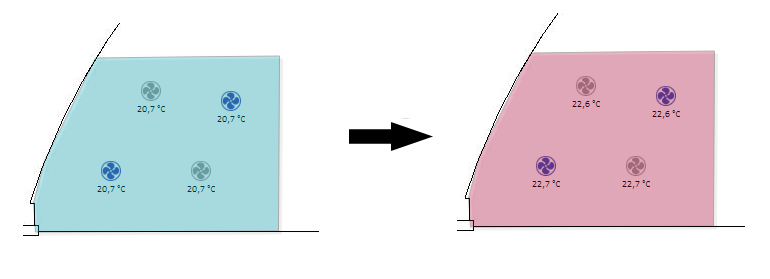
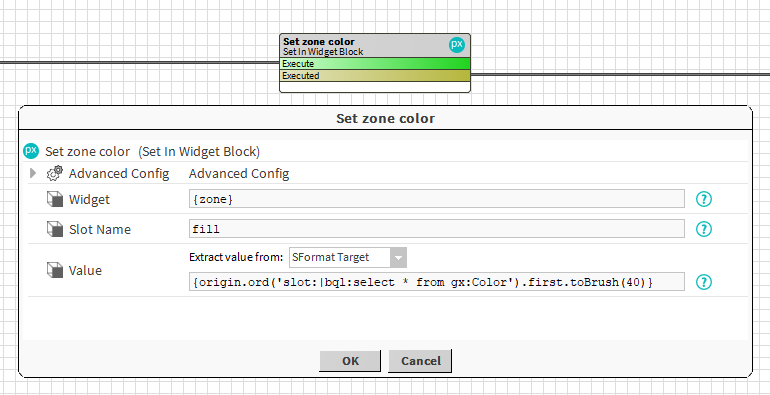
This block will set the fill property of a polygon (identified by the zone artifact) with a value taken from a bql query. Note we use the toBrush SFormat to convert a pure color (gx:Color) to a BBrush.
Properties
-
Widget: The widget should be identified by an artifact created from a previous block. Ex: {zone} which was created by a AddWidgetInPx block.
-
SlotName: SFormat to define the name of the property to set. Ex: fill, background, halign etc.
-
Value: The value to set in the slot. See General strategy parameters. Ex: a fixed value, or the result of a SFormat.
Advanced Config
-
UndoValue: If desired, the block can undo its operations. The old value of the slot is not saved but a new value can be defined and set in case of an undo. See General strategy parameters .Ex: set a default color.
-
PreserveIdentities: If enabled, the block writes the names of all widgets into the pxFile. This enhances performance when reading and updating the same px within a single strategy.
Behavior: DO
It sets a value in a widget slot
Behavior: UNDO
It does nothing or it sets a default value in a widget slot