
Summary
This block is used to set a widget layout. The SetSlotInWidget can be tricky when it's about setting a widget layout and especially only the position. The Layout is made of 4 parts: x,y, width and height. This block is specially designed to update only a part of a layout.
Implementation
-
Drag and drop the block from the palette
-
Link the "execute" action from the "executed" topic of the previous block
Example
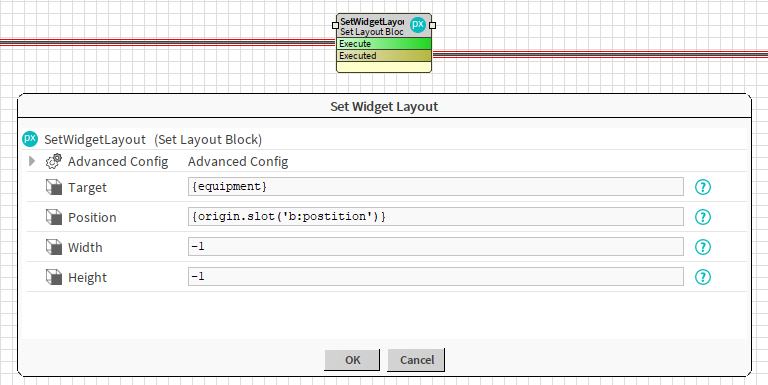
In this example we added before the following block a widget to a synoptic and created an artifact called {equipment}. We use the SetWidgetLayout block to position the widget without changing its width or height. The position is defined in a tag called b:position which is in the origin.
Properties
-
Target: SFormat to define the widget whose layout has to be changed. Ex: the widget defined as an artifact named "equipment" and created by a previous block.
-
Position: SFormat to define the position of the widget as a gx:Point (to define x and y). Use -1 if you want to keep the original one. Ex: a tag here called b:position of type gx:Point.
-
Width: SFormat to define the width of the widget. Use -1 if you want to keep the original one.
-
Height: SFormat to define the height of the widget. Use -1 if you want to keep the original one.
Advanced Config
-
Notes: available artifacts
-
XShift: SFormat to define the new x position of the layout. Does nothing if left empy
-
YShift: SFormat to define the new y position of the layout. Does nothing if left empy
-
PreserveIdentities: If enabled, the block writes the names of all widgets into the pxFile. This enhances performance when reading and updating the same px within a single strategy
Behavior: DO
The layout of the widget is updated.
Behavior: UNDO
The layout of the widget is unchanged (the system doesn't keep a trace of the old value).