
Description
The Timeseries Connector is the component responsible for managing the connection to a remote service and sending histories.
Implementation
-
Drag and drop the TimeSeries Connector from the palette (btibMqtt, btibMongo, etc) to Services > Btib Service > External Connectors > TimeSeriesConnectors.
-
Fill the adequate fields. Each TimeseriesConnector will have its specific fields.
-
Enable the connector. It is also possible to ping the Connector to check if it works.
Properties
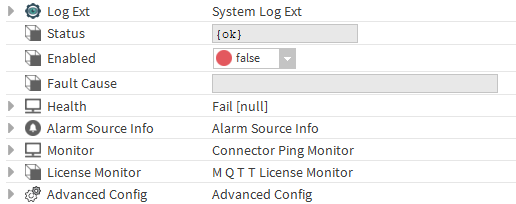
-
LogExt: See LogExt.
-
Status : Connection status.
-
Enabled : Enable/Disable the component.
-
Fault Cause : The error message status.
-
Health: Status of the connector
-
AlarmSourceInfo: Allows to configure the alarm if there an error on ping
-
Monitor: allows to monitor the connector for problems. Note: The implementation of the ping and the alarm functionality in the monitor is connector-specific.
-
Ping Enabled: enable pinging when there's a problem.
-
Ping Frequency: the frequency at which to ping
-
Alarm on Failure: enable alarms when there's a failure
-
Startup Alarm Delay: the delay to startup the alarm
-
-
LicenseMonitor: Component checking the license of the connector
Advanced Config
-
Nan Values Policy: The policy for nan values (send or ignore).
-
Infinite Values Policy: The policy for Infinite values (send or ignore).
Actions
-
Ping : Ping the Service.
Fault Causes
-
Unable to connect : Check your connection data, correct them if needed and ping the Connector again