
Description
The ClearHistories component allows you to delete orphan histories in the station. An history is orphan if the source that created it doesn't exist anymore.
Implementation
-
Drag and drop the component anywhere in a station
-
To find the orphan histories, right-click on the component and select Execute
-
Refresh the view
-
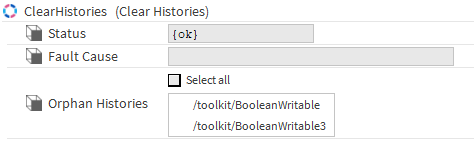
If some orphan histories where found, the OrphanHistories slot will display them
-
In the OrphanHistories slot, select the histories you want to delete
-
Right-click on the component and select Clear Histories and confirm
Properties
-
Status: The status of the action, {ok} if the action was successful, {fault} if an error occurred.
-
FaultCause: Provides an indication of the reason if an error happened
-
OrphanHistories: Displays the orphan histories found
Actions
-
Execute: Finds the orphan histories
-
ClearHisotries: Deletes the orphan histories
The view must be refreshed after each action to have up to date information