
Description
The NumericPointSelector component is used to automatically create links from or to the NumericPoints for the station.
Implementation
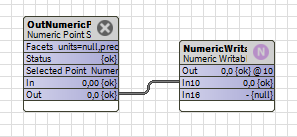
Double-clicking on the object when in a WireSheet opens a window allowing you to select the point to link via a drop-down list.
If a PointSelector object is duplicated, it reverts to its default state (no selection)
Properties
-
Facets: Takes the facets of the NumericPoint to which it is linked
-
Status: The status of the PointSelector. It can change to {overridden} if this action is triggered
-
SelectedPoint: The point selected
-
Container: The ord from which the object looks for points
-
ListFormat: The format for displaying points in the drop-down list.
Example: parent.displayName + '-' + displayName
-
Condition: Allows you to add a condition to the query that searches for the points in the container, for example on the display name of the point or its parent, (optional)
-
Selection: The drop-down list of NumericPoints in the container that satisfies the condition (if a condition has been entered). When a point is selected, the link is created or updated.
-
LinkDirection: Indicates the direction of the link (to the in slot or from the out slot of the PointSelector)
-
inSlot: In the case of an outbound link from the PointSelector, this property indicates to which slot the target object is linked.
-
In: BStatusNumeric input slot
-
Out: BStatusNumeric output slot. Can be overridden by the Override action or restored by the Auto action.
Actions
-
UpdateList: Updates the drop-down list of available NumericPoints
-
Override: Allows you to override the Out slot of the PointSelector to true or false (the output out then takes the {overridden} status)
-
Auto: Disables any override (the value and status of the out slot are identical to the in slot).