
Description
Allows configuring communication with the RUT modem for sending SMS messages.
Implementation
-
Drag and drop the RutSmsController into a RutService.
-
Fill in the Username and Password fields.
Properties
-
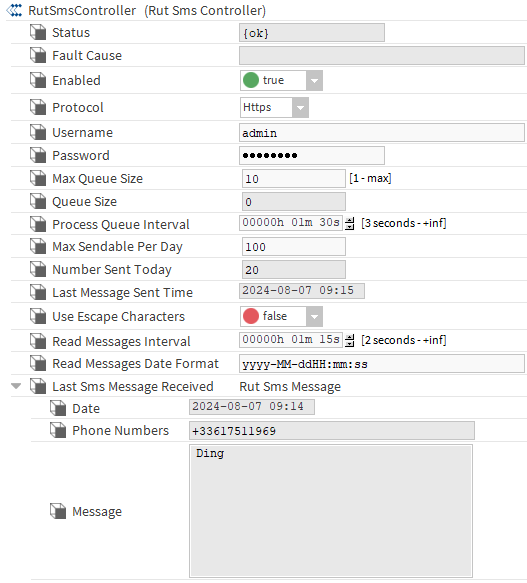
Status: The status of the controller:
-
{ok} - The component was successfully queried.
-
{Down} - The component did not respond.
-
{Disabled} - Indicates that the 'Enabld' property is false, the service is disabled.
-
{Fault} - Indicates a malfunction or anomaly
-
-
FaultCause: The reason for the status.
-
Enabled: Enables or disables the controller.
-
Protocol: Indicates which protocol will be used to connect to the RUT API.
-
HTTP: Service for HTTP connections (non-secure).
-
HTTPS: Service for HTTPS connections (secure).
-
-
Username**: The username used to authenticate with the API. To be put into your modem.
-
Password**: The password used to authenticate. To be put into your modem
-
Max Queue Size: Sets the maximum number of SMS messages stored in memory between two SMS sends. During the next send, all queued SMS messages will be sent.
-
Queue Size: The current number of stored SMS.
-
Process Queue Interval: The time interval between sending stored SMS.
-
Max Sendable Per Day: The maximum number of SMS that can be sent in a day.
-
Number Sent Today: The number of SMS sent today.
-
Last SMS Sent Today: The time when the last SMS was sent today.
-
(DEPRECATED) Use Escape Characters: Indicates whether special characters will be encoded in the sent SMS.
-
Read Messages Interval: The time interval between reading two SMS.
-
Read messages date format: The format used by the rut server to send messages. There is one by default but you can customize it according to your need, chek out this link for more informations about date Format .
-
Last SMS Message Received: Information about the last received SMS.
-
Date: The date when the SMS was received.
-
Phone Numbers: Sender's phone number.
-
Message: Content of the message.
-
** To be put into your modem: Service => SMS Gateway => Post/Get
Actions
-
Send: Allows sending an SMS.
-
Clear Queue: Deletes all stored SMS.
-
Process Queue: Sends all stored SMS.
-
Reset Number Sent Today: Resets the "Number Sent Today" counter to zero.
-
Read Messages: Reads messages from the server. Each read message will be deleted from the server.
-
resetLastSmsMessageReceived: allows to manually set the date property in the last smg message received. For this action to work properly, the date format in Tools → Options → General must be set to one of the Niagara-provided options, or at least follow the Niagara convetion (including using the proper case, such as Y for years instead of y)