
Description
The BtibTicketing module creates a dedicated space for managing Tickets within your system. This space serves as the primary location where most of your active tickets will reside before being archived. Once a ticket reaches the end of its lifecycle, it will be archived to theTicketDatabase.
Each ticket is stored in a specific TicketFolder, which is automatically generated based on the source template used to create the ticket. This ensures that each ticket is organized according to its template, allowing for easy tracking, retrieval, and management.
The system allows you to efficiently track ticket statuses, transition between states, and ensure they are correctly categorized and archived once resolved. This process streamlines ticket lifecycle management, improving both organization and accessibility.
This Space will be saved on any manual or automatic station save. It will also be saved if you disable your TicketService.
Implementation
-
Drag and drop a TicketService to your station.
-
Your station console should display logs similar to the following:

-
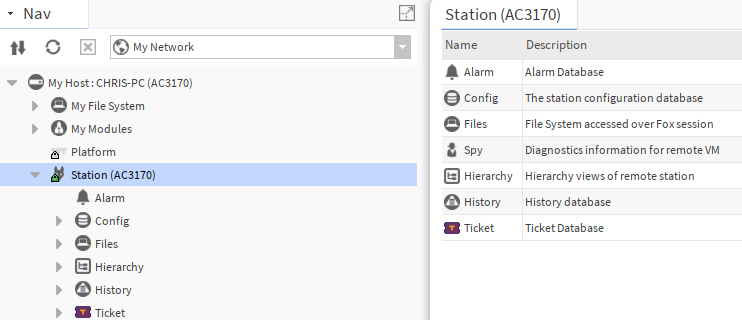
The first time, you will need to disconnect and reconnect to your station to see the Space.
An enabled TicketService is essential for TicketSpace to function properly.
If you remove it or disable it, your TicketSpace will be saved and stopped. Any further changes WON’T be saved.
Core features such as copy-paste, delete, and others may stop working or become unreliable.
The space will disappear only if you reboot your station.
If you put the TicketService back (or enable it) the core features will be restored. You will need to disconnect and reconnect to re-synchronize the space in the workbench.
Navigation
The TicketSpace is a new space, the “station:” query won’t allow you to reach it.
Similarly to alarm or histories, this space has its own scheme: Ticket Scheme.
The slotPath method will still return the slotPath for OpenTickets.
If you want to retrieve “TicketOrds”, a “getTicketOrd” method is available. (You can use it in tql by typing ticketOrd)