
Description
A Ticket is a tracked work item used to record, manage, and monitor a specific task, issue, request, or piece of work within a project, from creation through completion.
It is the core component of the module. Responsible for storing all standard ticket data as a reusable component.
A Ticket will exist in two forms:
Implementation
-
The module offers multiple ways to create a Ticket, see:
Tickets should be created exclusively using the BtibTicketing tools. Using other methods—including Tridium’s native tools (copy paste, duplicate, etc.)—may lead to conflicts with the expected naming conventions.
The tickets names are defined and created by their templates. You won’t be able to rename them.
Properties
-
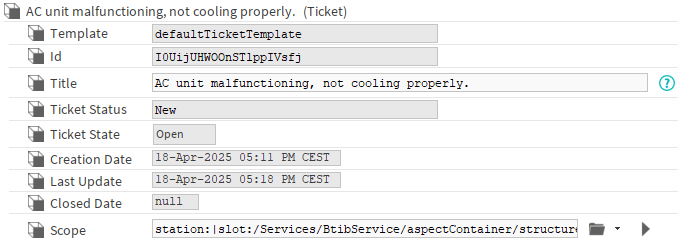
Template: The source TicketTemplate defining the content of this ticket.
-
Id: Unique internal ID for the ticket, filled automatically.
-
Title: The ticket's title used as a summary description for users.
-
TicketStatus: Current ticket status. Used to track the progress, the lifecycle of a ticket. See StatusDefinition for status options.
-
TicketState: Defines the ticket's location.
-
Open: Active ticket located in the TicketSpace
-
Closed: Ticket archived in the TicketDatabase
-
-
CreationDate: Ticket creation date, filled automatically. This timestamp corresponds to the creation of the ticket in Linksper, not necessarily to its initial creation date if it was created in a third-party tool and then integrated into Linksper.
-
LastUpdate: Date of last update, filled automatically.
-
ClosedDate: Archiving date, filled automatically.
-
Scope: Object the ticket applies to.
Those are the standard Properties available for all Tickets. See Ticket synchronization to customize your tickets.
Some of these properties (or their children) will have a sdo or vdo facet. Do not remove it, it is used for internal logic.