
Description
The TicketServlet is an entry point allowing to interact with your station through HTTP. Refer to the API swagger for more informations about the available endpoints
Implementation
-
Drag the component from the palette to the WebService
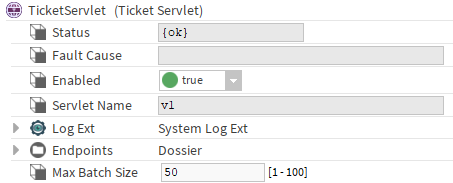
Properties
-
Status: Component status.
-
Fault Cause: Indicates the fault reason.
-
Enabled: Enables or disables the component.
-
ServletName: The name which will be used to target this servlet.
Example: https://<your.ip>/v1 -
LogExt: Btib Logger
-
Endpoints: A folder containing all the available endpoints. You can customize the rights on each endpoint in the Category Service
-
MaxBatchSize: Maximum number of allowed sub requests in the batch request
FaultCauses
|
Error Message |
Details |
TroubleShoot |
|---|---|---|
|
Missing BtibService |
The BtibService is not present in the Services. |
Add it from the palette to the Services. |
|
Disabled BtibService |
The BtibService is present but is not enabled. |
Enable your BtibService. |
|
Found no valid ‘activeTicketing' license |
The system could not detect a valid activeTicketing feature. |
In “station:|slot:/Services/PlatformServices/LicenseService” check that your Btib.licence contains the “activeTicketing” feature and check that it’s not expired.
|
|
Missing TicketService |
The TicketService is not present in the Services. |
Add it from the palette to the Services. |
|
The TicketService is not operational |
The TicketService experienced an error. |
Check the FaultCause on the TicketService. |
|
The WebService is not operational |
The WebService experienced an error. |
Check the FaultCause on the WebService. |