
Description
Use the TicketRecipient component to automatically generate a ticket from an alarm.
Implementation
-
Drag and drop the TicketRecipient component into
/Services/AlarmService. -
Create a link from the "Alarm" topic in your desired AlarmClass to the "Route Alarm" action in the TicketRecipient.
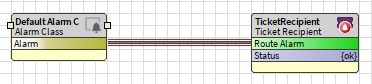
-
Configure the TicketTemplate subcomponent by filling in all required slots to extract the desired alarmData into your ticket.
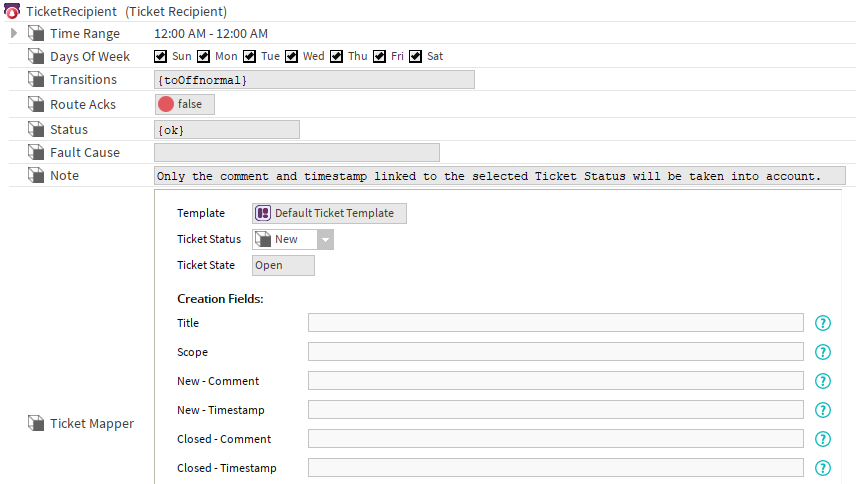
Once configured, any alarm with the "toOffnormal" transition sent to the recipient will automatically generate a ticket, with data populated using the specified SFormats.
Actions
-
SynchronizeTemplate: Synchronize the recipient with the corresponding template.
Properties
-
TimeRange: Time during which the recipient will receive alarms.
-
DaysOfWeek: Days during which the recipient will receive alarms.
-
Transitions: Alarm transition types the recipient wishes to receive.
-
RouteAcks: Route Alarm Acknowledgements
-
Status: Indicates the condition of the component.
-
FaultCause: The reason for the fault status.
-
Note: Reminder that only the comment and timestamp linked to the selected status will be taken into account. For example here, any value in “Closed - Comment” or “Closed - Timestamp” will be ignored.
-
TicketMapper: Component used to extract data from the alarm. See TicketMapperFieldEditor.
Extract values from the alarm
The base for the SFormats in the TicketRecipient will be the alarm (which type is alarm:AlarmRecord, you can find it in the workbench documentation if you search for BAlarmRecord).
You can use the BFormat or SFormat to access its properties.
Examples:
If you want to retrieve the the timestamp and set it in an AbsTime slot, use
-
{slot('timestamp')}, an SFormat which return an Abstime or
-
%timestamp.encodeToString%, a Format which return a String in the iso format.
DO NOT USE %timestamp% alone as it returns a String with an unsupported format.
If you want to retrieve a field from the alarmData, use %alarmData.field_name%
You can retrieve the source of the alarm and set it as the scope if
-
the alarm comes from the local station. You won’t be able to retrieve the Source if the alarm is remote
-
the baja:OrdList is whiteListed
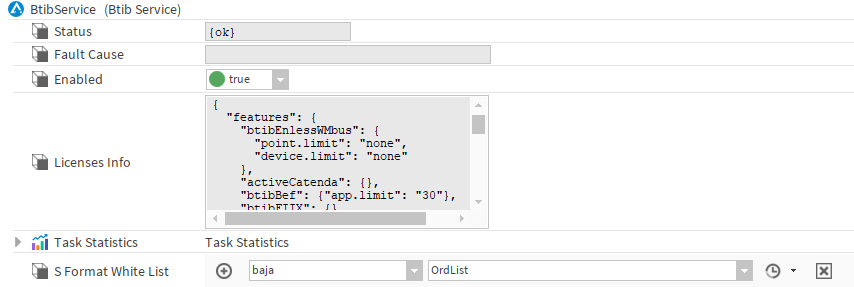
In this case use {slot('source').method('get',0)}
Fault Causes:
|
Error Message |
Details |
TroubleShoot |
|---|---|---|
|
Missing BtibService |
The BtibService is not present in the Services. |
Add it from the palette to the Services. |
|
Disabled BtibService |
The BtibService is present but is not enabled. |
Enable your BtibService. |
|
Found no valid ‘activeTicketing' license |
The system could not detect a valid activeTicketing feature. |
In “station:|slot:/Services/PlatformServices/LicenseService” check that your Btib.licence contains the “activeTicketing” feature and check that it’s not expired.
|
|
Missing TicketService |
The TicketService is not present in the Services. |
Add it from the palette to the Services. |
|
The TicketService is not operational |
The TicketService experienced an error. |
Check the FaultCause on the TicketService. |
|
Missing TicketTemplate |
Cannot find the associated TicketTemplate. |
Add the TicketTemplate in the TicketTemplates and reselect it in the Template slot. |
|
The TicketTemplate is not operational |
The associated TicketTemplate experienced an error. |
Check the FaultCause on the associated TicketTemplate. |