
Description
The TicketTemplate component will be the blueprint for your Tickets. In addition you will also be able to interact with your TicketDatabase and check the state of your template.
Implementation
-
Present in the TicketTemplates by default.
Actions
-
SynchronizeTemplate: Applies the Template to
-
its associated Tickets.
-
the TicketDatabase.
-
-
CreateTicket: Creates a new Ticket. You cannot assign a Ticket to any component, see Ticket synchronization | Filtering the components to which you can assign a Ticket for more information.
-
ForceResolveSlot: This action recomputes the values in the resolvedSlots of your existing Tickets.
You can choose to update all tickets or only open Tickets.
The Actions can only be triggered if the TicketTemplate status is ok.
To trigger CreateTicket or ForceResolveSlot, the TicketTemplate must also be synchronized
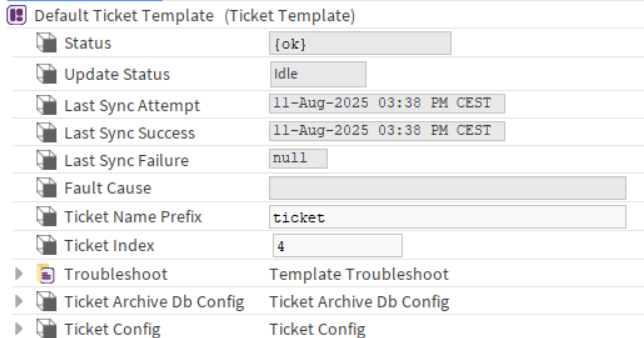
Properties
-
Status: Indicates the current test status — {ok} if successful, {fault} if an error occurred.
-
UpdateStatus: Indicates whether the template is synchronized on the station.
-
Idle: The template is synchronized and up to date.
-
OutOfSync: This status signals that changes need to be propagated to the station. The template detects modifications which have an impact on your Tickets and automatically switch to this state.
-
InProgress: The template is currently synchronizing. The duration may vary depending on the station's size and complexity.
-
Do not modify the template if the status is ‘InProgress’. It might result in an incomplete synchronization.
-
LastSyncAttempt: Timestamp of the most recent synchronization.
-
LastSyncSuccess: Timestamp of the most recent successful synchronization.
-
LastSyncFailure: Timestamp of the most recent failed synchronization.
-
FaultCause: Displays the error message if the synchronization fails. Will also display faults comming from the Troubleshoot or the TicketService.
-
Troubleshoot: Ensures correct module behavior.
-
TicketNamePrefix: A customizable prefix added to the beginning of each ticket's name. Useful for identifying tickets by project, department, or template (e.g., ROOM-, MAINT-, IT-). Cannot end with a number.
-
TicketIndex: A sequential number appended to the ticket name to ensure uniqueness. Automatically increments with each new ticket created using the same template. Example: If TicketNamePrefix = MAINT- and TicketIndex = 42, the ticket name will be MAINT-42.
The TicketIndex is independant from the TicketNamePrefix. Changing the Prefix will not reset the index.
-
TicketArchiveDbConfig: Allows the interaction with the TicketDatabase
-
TicketConfig: Component allowing you to define the blueprint of your Tickets
Fault Causes:
|
Error Message |
Details |
TroubleShoot |
|---|---|---|
|
Missing BtibService |
The BtibService is not present in the Services. |
Add it from the palette to the Services. |
|
Disabled BtibService |
The BtibService is present but is not enabled. |
Enable your BtibService. |
|
Found no valid ‘activeTicketing' license |
The system could not detect a valid activeTicketing feature. |
In “station:|slot:/Services/PlatformServices/LicenseService” check that your Btib.licence contains the “activeTicketing” feature and check that it’s not expired.
|
|
Missing TicketService |
The TicketService is not present in the Services. |
Add it from the palette to the Services. |
|
The TicketService is not operational |
The TicketService experienced an error. |
Check the FaultCause on the TicketService. |
|
The Ticket Template is not synchronized |
Some changes where detected in the TicketConfig. |
Trigger the SynchronizeTemplate action. |
|
Custom error from a descendant Test |
A descendant Test with a “severe” severity detected an error in the station. |
See the Note in the Test. |