
Permissions for tickets are managed differently from permissions applied to other Niagara components.
To ensure consistent access control, we introduced the TicketTemplatecomponent, which defines the structure and content of tickets. Following this design principle, we wanted ticket permissions to be driven by the templates themselves rather than being configured independently on each ticket.
Category Service
As a result, the tickets do not appear in the CategoryBrowser. You cannot set permissions on individual tickets.
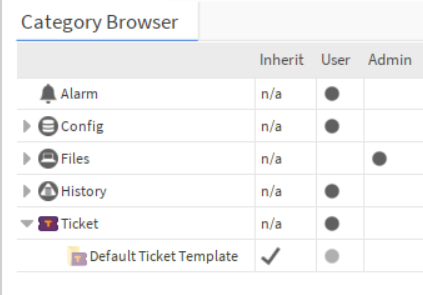
Instead, Ticket permissions are defined by the permissions on their TicketTemplate.
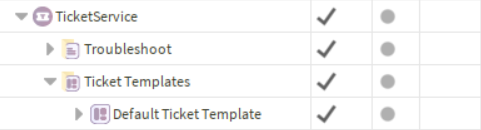
Any permissions configured on a Ticket Template are automatically propagated to all tickets created from that template. This approach simplifies administration, guarantees consistency across tickets, and ensures that access rights remain aligned with the template definition throughout the ticket lifecycle.
Ticket Template
Niagara allows finer control of specific component slots using the min, max, readOnly and operator flags
Although you can set flags manually on each ticket slot, the TicketTemplate lets you define them for all tickets via the SlotDefinitions.
The readOnly flag applies only when a user views or edits a ticket directly in a web or workbench view (for example, PropertySheet or TicketView). Our Tools will ignore this flag for more flexibility.
Permission checks
Most permissions on a ticket and its slots are defined by the CategoryService and the ticket’s template. For added security, extra checks and exceptions were implemented.
For clarity, here is the exhaustive list of additional checks for each slot.
Template
No additional Rules
Id
The Id is automaticaly generated, you won’t be able to update it.
Title
No additional rules
TicketStatus
To set a TicketStatus on a Ticket, you must have the invoke right on the associated TicketStatusValue.
TicketStatusValues will create an action on the Ticket, see Ticket synchronization | TicketStatusDefinition. To invoke an Action you must have the invoke right on the Associated TicketStatusValue.
TicketState
The TicketState is automaticaly set depending on the TicketStatus, you won’t be able to update it.
CreationDate
The CreationDate is automaticaly set on the Ticket creation, you won’t be able to update it.
LastUpdate
The LastUpdate is automaticaly set on the each Ticket update, you won’t be able to update it.
ClosedDate
The ClosedDate is automaticaly set on the each Ticket update, you won’t be able to update it.
Scope
To be able to set a Scope:
-
the user must be able to read the target Component
-
the Component must be a Node or a Source (component with an InfoSource)
-
the Component must match at least one predicate in the ScopeSlotDefinition
AbstimeSlot
No additional rules
ExternalId
The write permissions on an ExternalId are defined by the write permissions on the associated ExternalIdSlotDefinition.
For exemple, with the following configuration
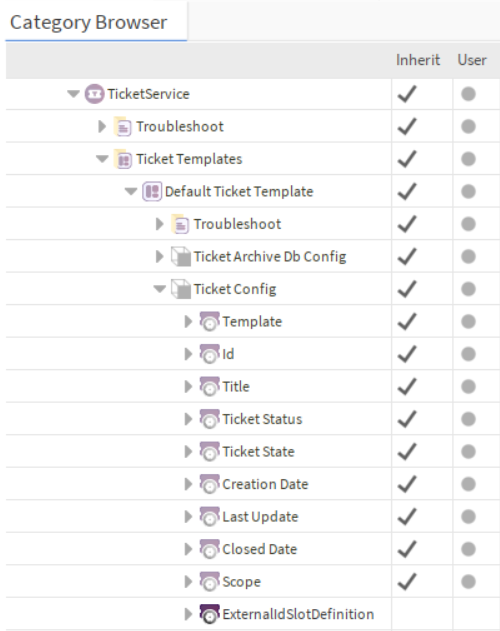
A User with the User role will be able to see the ExternalIdSlotDefinition (thanks to its rights to the template) but won’t be able to change it.
ResolvedString
The ResolvedString is automaticaly set on Ticket creation or when the “ForceResolveAllSlot” action is invoked on the TicketTemplate, you won’t be able to update it.
SFormat
No additional rules
String
No additional rules
StrictList
To set a Value in a StrictList, the user must have the write rights on the associated StrictListValue.
ClosedTicket
All ClosedTicket’s slots will be readOnly for web or workbench users.
The previously defined rules also apply to closedTickets.
Currently, it is not possible to unarchive a ticket. So you won’t be able to set a TicketStatus with toArchive=true on a ClosedTicket.