
A new schema has been introduced to simplify querying of both OpenTickets and ClosedTickets. This scheme mirrors the BQL but is tailored specifically for Tickets, ensuring consistency and ease of use.
In this documentation, we highlight the key differences from BQL as well as the unsupported features.
Syntax
The syntax is the same:
select <projection> from <extent> where <predicate> <having> <order by>
Projection
All the tools available in the bql projection are also available in the tql projection.
One limit is the fact that the ClosedTickets don’t exist in the station so some path expressions won’t be available (the most notable one being parent)
DisplayValue
Some slots like the
-
Title
-
TicketStatus
-
StrictList
store a raw value but display a different one (displayValue). By default, a bql or tql shows the raw value.
Tql lets you retrieve the displayValue using the ".valueDisplayName" suffix.
Example:
We have a template with this StrictListSlotDefinition
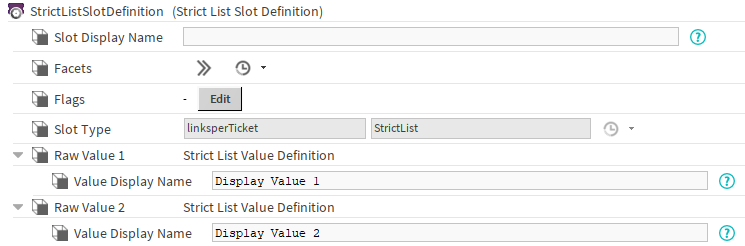
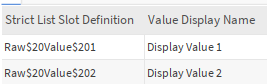
In the Tickets, the rawValue is the name of the StrictListValueDefinition, the displayValue is the value in the ValueDisplayName slot.
Here is the result of the “ticket:/defaultTicketTemplate|tql:select StrictListSlotDefinition, StrictListSlotDefinition.valueDisplayName from btibTicketing:Ticket” query:
Extent
The extent of a TQL is limited to three types:
-
btibTicketing:Ticket, which targets all Tickets (open and closed)
-
btibTicketing:OpenTicket, which targets all OpenTickets
-
btibTicketing:ClosedTicket, which targets all ClosedTickets
Predicate
All tools provided in the BQL projection are also supported in the TQL projection, except for some path expressions on ClosedTickets (They don’t exist in the station, thus they don’t have a parent for example).
Having
Same logic as BQL Having.
Order By
Same logic as BQL Order By.
By default, the ticket ordering is as follows:
-
OpenTickets appear first, in the same order as they are listed in the TicketSpace.
-
ClosedTickets appear last, sorted by archiving date, using a First In, First Out (FIFO) approach
Group By
Same logic as BQL Group By.
Aggregate and Scalar Functions
Same logic as BQL Aggregate and Scalar Functions.
Additionnal Keywords
Top
Same logic as BQL Top.
Stop
Not implemented.
Depth
Not implemented.
Interaction with other queries
Ticket:
You will be able to use a tql after a “ticket:” query.
exemples:
-
“ticket:|tql:select * from btibTicketing:Ticket” will retrieve ALL Tickets.
-
“ticket:/<templateName>|tql:select * from btibTicketing:Ticket” will retrieve all the ticket in the template with the given template name.
Slot:
You will be able to use a tql after a “slot:” query targeting a Node or a Source (Component with an InfoSource). If the slot: query targets another component, the tql will fail.
exemple:
-
“station:|slot:/<pathToNodeOrSource>|tql:select * from btibTicketing:Ticket” retrieves all tickets whose scope targets the Node or Source specified in the slot query.
Rights
Similarly to bqls, only the Tickets readable by a User will be displayed in the results of a tql.