
Description
The OneDriveFileImporter component imports all the SharedLibraries, folders and files belonging to the user defined in the .
Implementation
-
Drag and drop the component into the BtibService/Reference directory of the station.
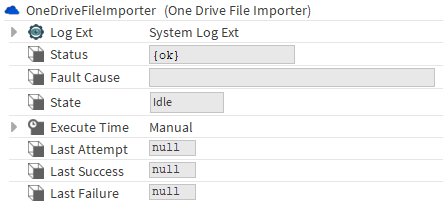
Properties
-
Status: Indicates the status of the service. Especially in the case of a fault or if it is disabled.
-
FaultCause: Indicates the fault reason, if any, (often, it is that the license is not active).
-
State: State of the import (Idle, Pending, In Progress).
-
ExecuteTime: To configure when to import the files.
-
Last Attempt: Datetime of the last import attempt.
-
Last Success: Datetime of the last successful attempt
-
Last Failure: Datetime of the last failed attempt.
Actions
-
Execute: Trigger the file import.
It is possible to configure the data imported in the SharedLibraries, folders and files using