Description
The RecipientSwitch component is used to route received alarms to different recipients based on a schedule of on-call users and alarm escalations.
Implementation
-
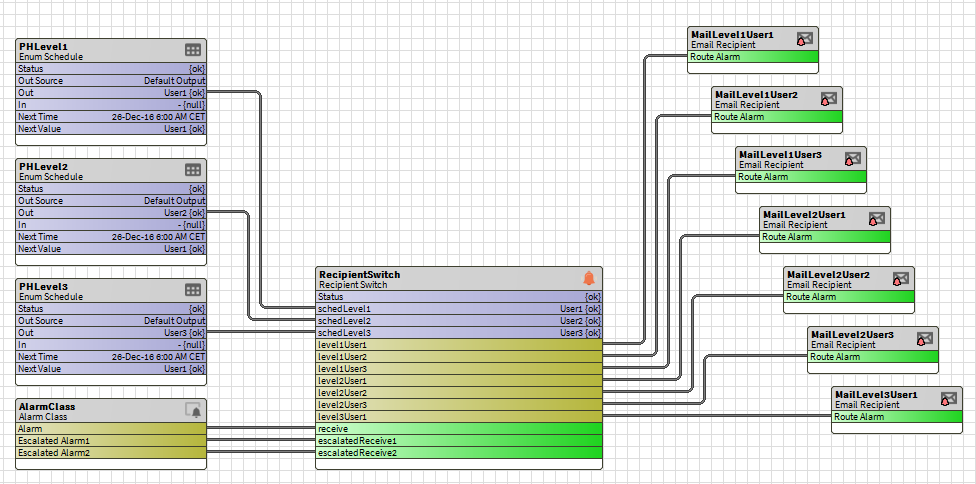
Copy and paste the component into the AlarmService
-
Set the number of users per level from the component's LevelXUserCount slots
-
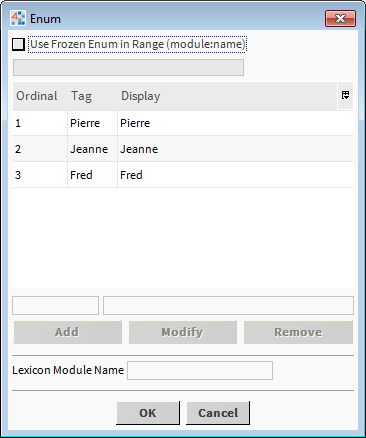
Prepare "EnumSchedule" type time schedules by defining names corresponding to the different related recipients in the "range" slot, starting with the ordinal 1 (see screen shot below).
-
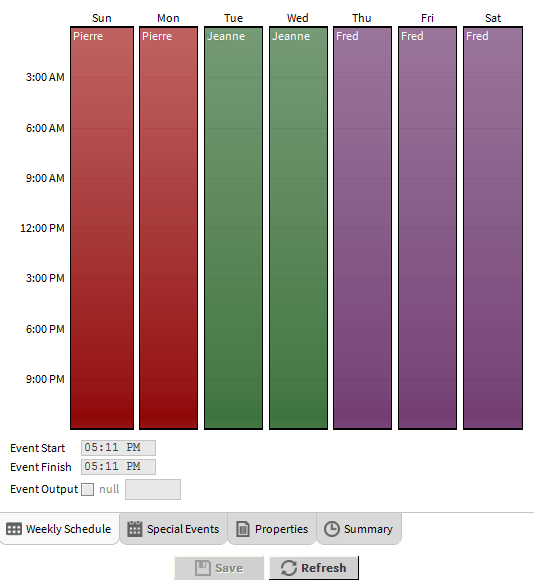
Then define the time slots corresponding to the different recipients in each EnumSchedule.
You cannot link ConsoleRecipient components to this object
-
Link the Out slots of your EnumSchedule components to the SchedLevelX slots of the RecipientSwitch for each escalation level.
-
Link the LevelXUserY slots of the RecipientSwitch to the routeAlarm slot of your existing recipients based on the list defined in the EnumSchedule of the associated level.
-
Link the alarm topics of the alarm classes (AlarmClass) to the receive slot of the RecipientSwitch. Also link the EscalatedReceiveX topics to the EscalatedAlarmX slots if necessary.
Properties
-
Status: Indicates the general status of the component, {ok} if the operation was successful or {fault} to indicate abnormal behavior
-
FaultCause: Indicates the cause of a configuration error. The FaultCause is empty if the component is properly configured.
Configuration error: Execution of the component is blocked while it is misconfigured (non-empty Status.fault and FaultCause).
-
LastExecFailure: The date and time of the last execution failure of the component
-
LastExecFailureCause: The reason for the last execution failure of the component
Runtime Error: If the component fails to run, its status changes to fault. This status is lost if the configuration is changed but remains valid and if the station restarts.
-
LevelXUserCount: Determines the number of users per level. If this is 0, the level is considered not to exist.
-
SchedLevelX: Entry defining to which recipient the alarm will be redirected
Actions
-
EscalatedReceiveX : Actions allowing the reception of alarms from the alarm classes according to their level of escalation
Topics
-
LevelXUserY : Propogates the alarm to the associated recipient based on the associated EnumSchedule and the alarm level.
Errors
Configuration erorrs
-
-
LevelXUserCount: As soon as a level X is defined with 0 users, all subsequent levels are ignored. The following levels must therefore all be set to 0.
-
SchedLevelX: The value of a SchedLevelX must be between 1 (inclusive) and the number of users defined for this level X (from the LevelXUserCount slot) (inclusive).
-
Exécution errors
-
-
The level of the action cannot be found: the "receive" (or "escalatedReceive") action was renamed. In this case, set level X to 0 and then reset it to the right number of users via the levelXUserCount slot.
-
The SchedLevelX property cannot be found: to make it reappear, set level X to 0 and then reset it to the right number of users via the levelXUserCount slot.
-
The status of the SchedLevelX property is invalid: the execution is canceled; change its state to a valid one.
-
The levelXUserY topic cannot be found: either the property does not exist or it is not a topic. If it exists, delete it, set level X to 0 and then reset it to the right number of users via the levelXUserCount slot.
-
Training
You can follow this e-learning course to practice