
Summary
This block is used to create a link between source(s) and target(s).
Implementation
-
Drag and drop the block from the palette
-
Link the "execute" action from the "executed" topic of the previous block
-
By convention, we name the block with the source slot name, an arrow and the target slot name: "sourceSlotName -> targetSlotName"
Example
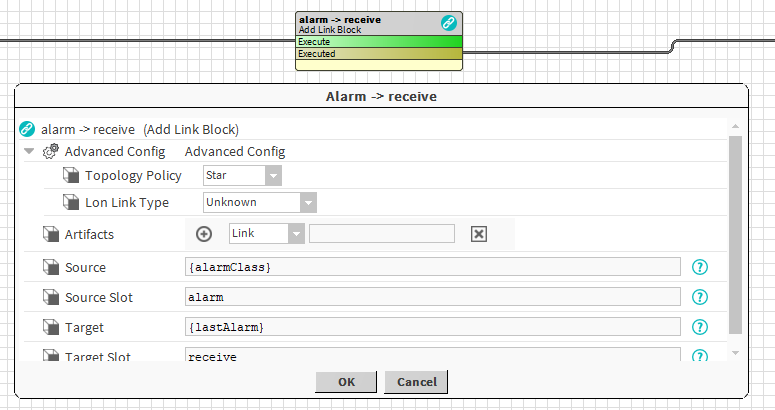
This block creates a link between two artifacts:
-
AlarmClass: the alarm classes created by a previous block (it's an array of alarm class). The link is created from the slot "alarm"
-
LastAlarm: this is a component from btibToolkit which displays the last X alarms. The link is created to the slot "receive"

Properties
-
Artifacts: Artifacts created by this block
-
Link: link(s) created. Ex: the 2 links between Electricity Level 1 & Electricity Level 2 and Last Alarm
-
-
Note: The available artifacts
-
Source: SFormat to define the source component of the link. Ex: the AlarmClasses added by a previous block
-
SFormat: artifacts "target" and "source" are available to resolve the slot name depending on source or target. Ex: LonLink on {source.slot('objectId').subtract(5)}
-
-
SourceSlot: SFormat to define the name of the source slot. Ex: topic "alarm" of each AlarmClass (Electricity Level 1 & Electricity Level 2)
-
Target: SFormat to define the target component of the link. Ex: the LastAlarm of the AlarmService
-
TargetSlot:
SFormat
to define the name of the target slot. Ex: action "receive" of the LastAlarm
-
-
Note: you can use {source} or {target} when you want to access to a value from each element of artifacts. Example: nvoAitherSensor{source.slot('objectId').subtract(3).toInt}
Advanced Config
-
Topology Policy: Define the topology of the links to create between several sources and several targets
-
Chain: each source is linked to the first target and it starts a chain with every target. Ex: Source 1 -> Target 1 -> Target 2 -> ... && Source 2 -> Target 1 -> Target 2 -> ...
-
Star: each source is linked to every target. Ex: Source1 -> Target 1 && Source 1 -> Target 2 && Source 2 -> Target 1 && Source 2 -> Target 2
-
Parallel: each source is linked to only one target corresponding by index. Ex: Source 1 -> Target 1 && Source 2 -> Target 2...
-
-
LonLinkType: Appears only if the LonModule is installed in the station. You can choose what type of LonLinks to create. Be careful with the restrictions offered by the Lon Protocol.
Behavior: DO
Links are created between target(s) and source(s).
Behavior: UNDO
If they still exist, links are removed between target(s) and source(s).