
Summary
This block sets facets on a slot (units, precision, min etc.)
Implementation
-
Drag and drop the block from the palette
-
Link the "execute" action from the "executed" topic of the previous block
Example
Set the units on point facets. The event is triggered by an InfoSource in a ControlPoint. We set the units to kW-hr in the parent (the point).
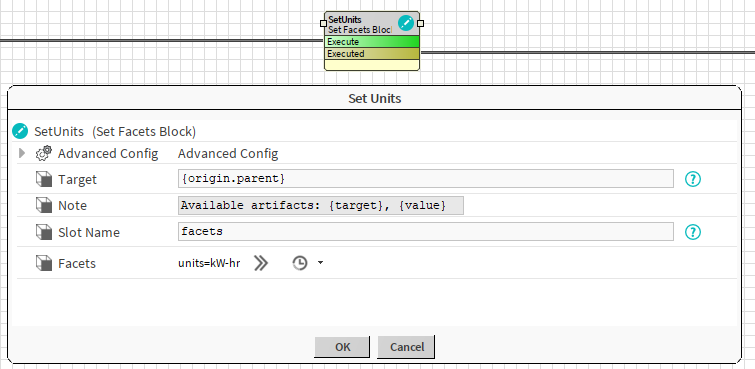
Properties
-
Target: SFormat to define the component which contains the slot whose facets have to be changed. Ex: the point
-
Note: The available artifacts
-
SlotName: SFormat to define the name of the slot whose facets need to be applied to. Ex: the facets slot
-
Facets: Selection of the facets to apply
Advanced Config
-
Set Only First: If set to true, the block will only do the operation at its first execution (If you rerun the strategy, the operation won't be done again). If set to false, the block will always try to do the operation.
-
Do Policy : Defines the policy to apply when adding facets
-
Add value: the selected facets will be added to existing ones
-
Set Value: the selected facets will be set in place of the existing ones
-
-
Undo Policy: Defines the policy to apply on UNDO
-
No Value: nothing is changed. Facets are let as they are
-
Set Value: A new value is applied (Undo Value)
-
Remove Value: The selected facets are removed (others are kept)
-
-
Undo Value: The facets to apply when Undo Policy is set to "Set Value"
Behavior: DO
Facets are added or set depending on the Do Policy
Behavior: UNDO
Facets are removed or new facets are set, or nothing happens depending on the Undo Policy