
Summary
The PointExt allows a point to interact with a remote Service.
The Point will be able to send data but it will also be possible to modify the point from the Service.
Implementation
-
First you must setup a RealTimeConnector and a parent Device with a DeviceExt.
-
Drag and drop the PointExt from the palette to any Point.
-
If needed change the Device Query to target a Component with a DeviceExt and initialize the PointExt.
Properties
-
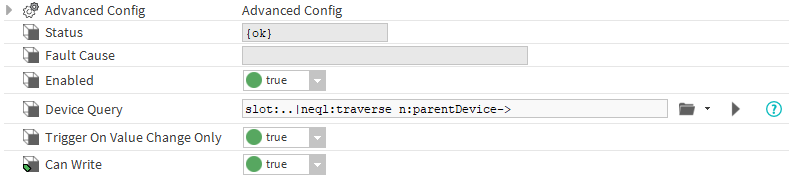
Status: Status of the PointExt.
-
FaultCause: Message that complements the PointExt status (generally used to explain the reason for an initialization failure).
-
Enabled: Indicates whether the Extension is enabled or not.
-
DeviceQuery: Ord to the related Device.
-
TriggerOnValueChangeOnly: By default a value is sent only if the extension detects a change. but you can change this by switching this property to false.
-
CanWrite: Determines whether the database can change the value of the parent WritablePoint through a command.
Advanced Config
-
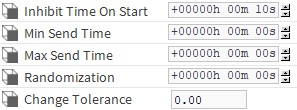
InhibitTimeOnStart: Delay the messages sent during the station start.
-
MinSendTime: The Minimum time between two sent messages. Any attempt made during this interval will be cancelled.
-
MaxSendTime: The Maximum time between two sent messages, even if the point hasn't changed.
-
Randomization: Allows to add a random duration to the first maxSendTime. Prevents a burst of message if many points, which don't change, have the same maxSendTime.
-
ChangeTolerance: Available only on NumericPoints. Determines the smallest change in the out value which will send a message.
Actions
-
Initialize : Register the point and initialize the connection with the Service.
-
Disable : Disable the extension.
-
Clean : Unregister the point.
Fault Causes
-
No Device Found : Make sure that your query points to a component that contains at least one device extension.
-
Cannot Send Message : Make sure the the extension is working and the connector too.
-
Extension Is Disabled : Try to enable your device extension.