
Description
The RealTimeConnector is the responsible for managing the connection to the remote service.
Implementation
-
Drag and drop the RealTimeConnector from the palette (btibAWS, btibIotHub, etc) to Services > Btib Service > External Connectors > Realtime Connectors.
-
Fill the adequate fields. Each RealTimeConnector will have its specific fields.
-
Enable the connector. It is also possible to ping the Connector to check if it works.
Properties
-
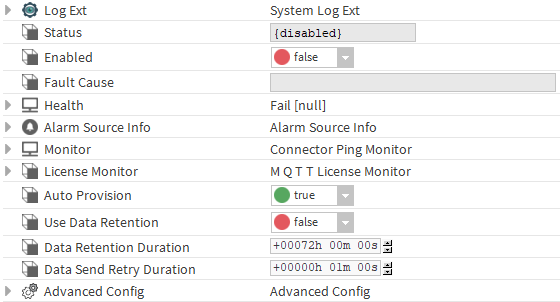
LogExt: See LogExt.
-
Status : Connection status.
-
Enabled : Enable/Disable the component.
-
Fault Cause : The error message status.
-
Health: Status of the connector.
-
AlarmSourceInfo: Allows to configure the alarm if there an error on ping.
-
Monitor: allows to monitor the connector for problems. Note: The implementation of the ping and the alarm functionality in the monitor is connector-specific.
-
Ping Enabled: enable pinging when there's a problem.
-
Ping Frequency: the frequency at which to ping
-
Alarm on Failure: enable alarms when there's a failure
-
Startup Alarm Delay: the delay to startup the alarm
-
-
LicenseMonitor: Component checking the license of the connector
-
Auto Provision: Create and manage devices automatically.
-
Use Data Retention : Enable data retention for this connector.
-
Data Retention Duration : The duration of the Data Retention.
-
Data Send Retry Duration : The amount of time to wait before retrying to send data.
Advanced Config

-
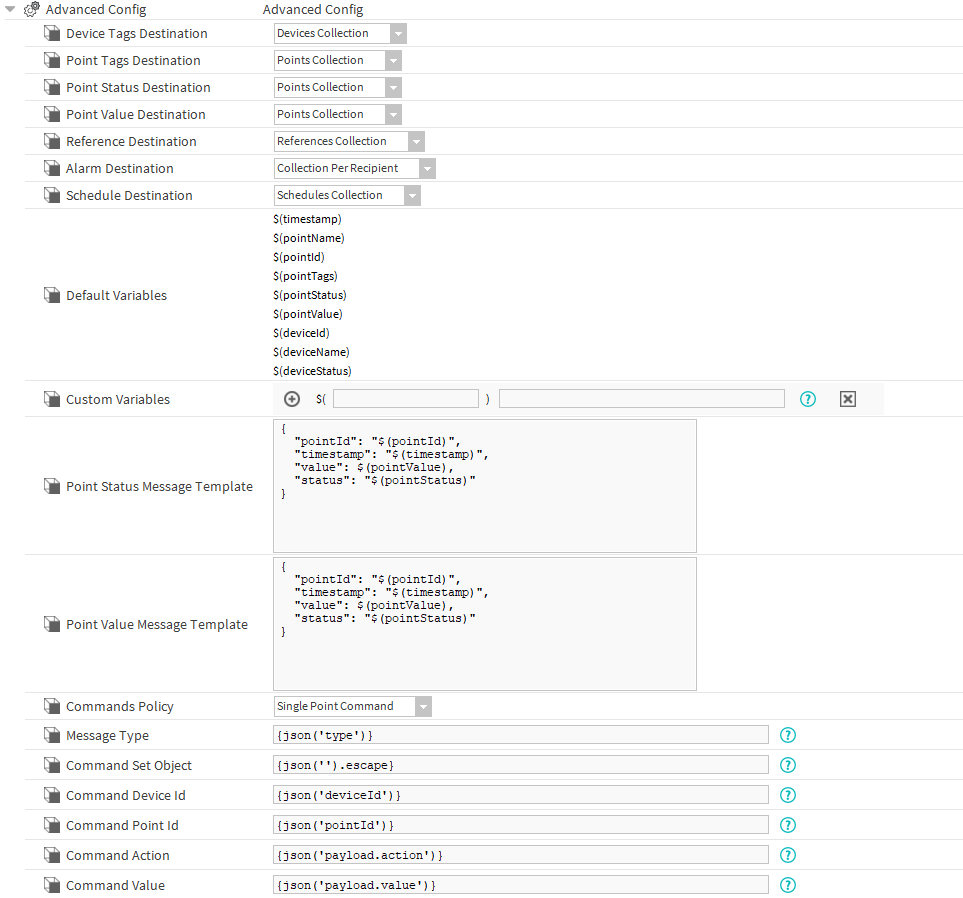
DeviceTagsDestination: The destination where device tags will be sent during the initialization.
-
PointTagsDestination: The destination where point tags will be sent during the initialization.
-
PointStatusDestination: The destination where the point status message will be sent.
-
PointValueDestination: The destination where the point value message will be sent.
-
ReferenceDestination: The destination where the reference message will be sent.
-
AlarmDestination: The destination where the alarm messages will be sent via the alarm recipient associated to this connector.
-
ScheduleDestination: The destination where the schedule messages will be sent.
-
DefaultVariables: The default variables to be used by the messages template.
-
CustomVariables: Set of user defined variables to be used by the messages template.
-
PointStatusMessage Template: The status message template used to construct the message to be sent by the connector.
-
PointValueMessage Template: The value message template used to construct the message to be sent by the connector.
-
CommandsPolicy: The commands policy either single or multi message.
-
MessageType: The type of the message (Default: POINT_ACTION).
-
CommandSetObject: The json format that contains the commands if the command policy is multi message.
-
CommandDeviceId: The sformat path to extract the device id from the external message.
-
CommandPointId: The sformat path to extract the point id from the external message.
-
CommandAction: The sformat path to extract the command action from the external message.
-
CommandValue: The sformat path to extract the value from the external message.
-
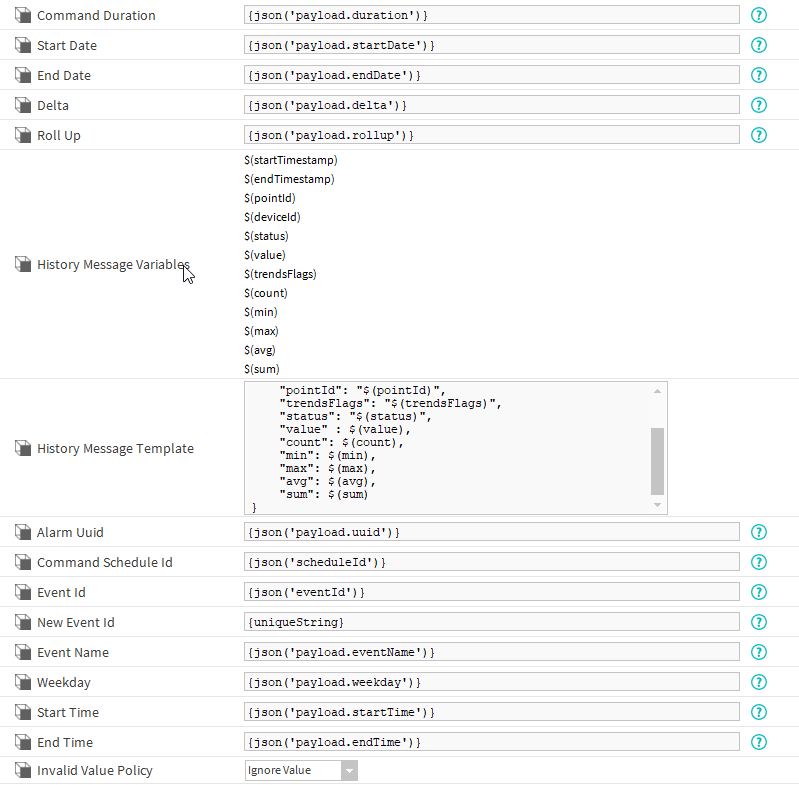
CommandDuration: The sformat path to extract the command duration in seconds from the external message.
-
StartDate: Start timestamp of the history (Optional).
-
EndDate: The end date for the history (Optional).
-
Delta: Apply a delta for the history (Default: false).
-
RollUp: Apply a rollup for the history (Optional).
-
HistoryMessageVariable: Set of predefined variables to use in the history message template.
-
HistoryMessageTemplate: The template message to use for the history message.
-
AlarmUUID: The sformat path to extract the uuid.
-
CommandScheduleId: The sformat path to extract the schedule id from the external message.
-
EventId: The sformat path to extract the eventid from the external message. Will be used to target an event in update or delete commands
-
NewEventId: The sformat path to extract the eventid from the external message. Will be used to create the id of a new event (create command)
-
Weekday: The sformat path to extract the weekday from the external message.
-
StartTime: The sformat path to extract the startTime from the external message.
-
EndTime: The sformat path to extract the endTime from the external message.
-
InvalidValuePolicy: What to do when an invalid value detected.
-
InvalidStatusPolicy: Determines which out values will be filtered. Any point with a Status matching any Status in this slot won't be sent to the database.
-
JsonMessagePolicy: The policy to use for value that contains json text.
-
TagsInclude: Determines which tags will be included during the export of devices or points. If the value is "*", everything will be added.
-
TagsExclude: Determines which tags will be excluded during the export of devices or points. Will be ignored if tagsInclude is filled.
Actions
-
Ping : Ping the Service.
Fault Causes
-
Unable to connect : Check your connection data, correct them if needed and ping the Connector again