
Description
StatusFE is a field editor used to change the status of a ticket (e.g., Open, In progress, Paused, Closed).
The statuses appear as horizontal buttons, and only one status can be selected at a time.
If the selected status is a closing status, a confirmation popup is displayed before the change is applied.
If the ticket is already closed, all buttons become disabled, and the component switches to read‑only mode.
How It Works
1. Selecting a Status
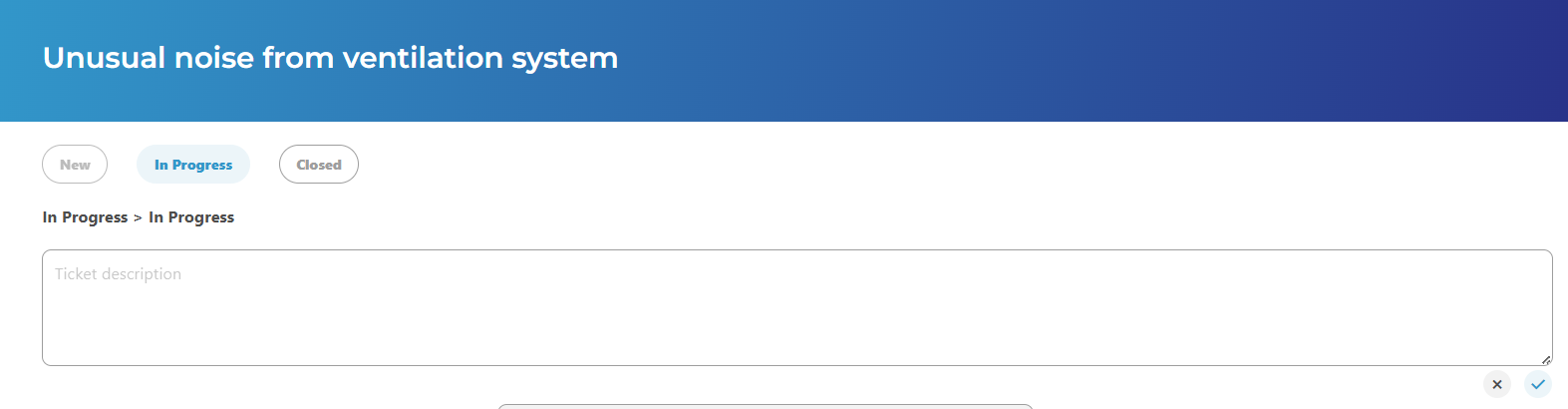
When the page loads, the ticket’s current status is pre‑selected.
In this example, the ticket is in the In progress state:
If you click again on the same status, the breadcrumb displays: Ticket in progress > Ticket in progress
A comment field appears underneath.
It is automatically filled with the current comment associated with that status (if any).
You may edit this comment or write a new one.
Validation buttons appear as soon as a status is selected or the comment is modified:
Closing the Ticket (Closed / Archived)
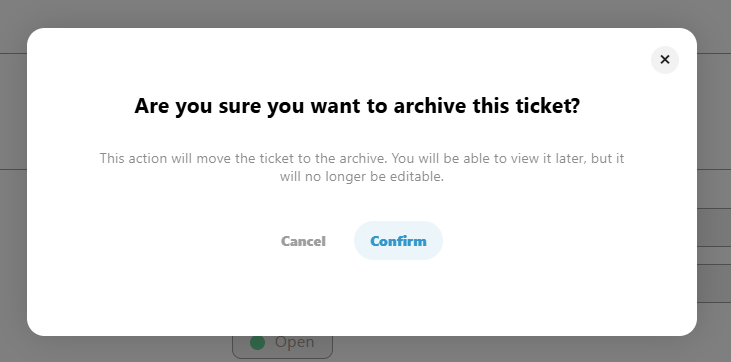
If you select a closing status, such as Closed ticket, a confirmation popup will appear when clicking the validation button:
"Are you sure you want to archive this ticket?"
-
If you confirm:
The ticket is closed, the status is updated, and all status buttons become disabled. -
If you cancel:
The action is aborted, and the comment field returns to its previous state.
Useful Details
-
The active status appears in a distinct color.
-
Statuses that the user does not have permission to view are not displayed, except for the current status, which is always displayed.
-
A visible status can only be clicked if the user has sufficient invoke permission on its associated action. Otherwise, it remains visible but cannot be selected.
-
The breadcrumb always shows the transition, even if selecting the same status twice.
-
When the change is validated, the comment and timestamp are updated in the ticket’s history.
Special Cases
-
If the ticket is already closed, the entire component is disabled.
-
Users may edit or cancel their changes before validation.