
Used as
-
Card
Summary
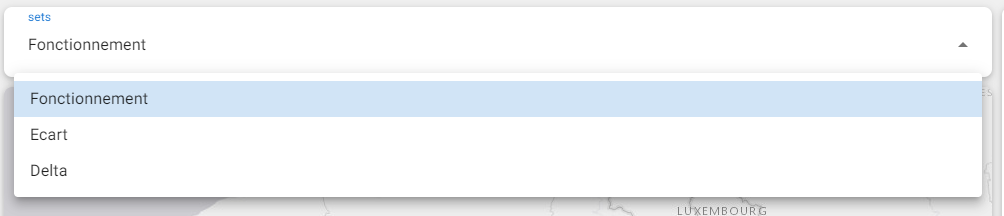
This widget is used to select a DataSet in a list of DataSets. The selection will be propagated into other Cards like MapLocationView, LiveChartView and EnhancedBoundTable.
Implementation
There are two ways to add it to the FlexView:
-
Add a card from the settings bar, and choose in the list DataSetFilter
-
Or drag&drop a px file from the nav tree into a FlexView
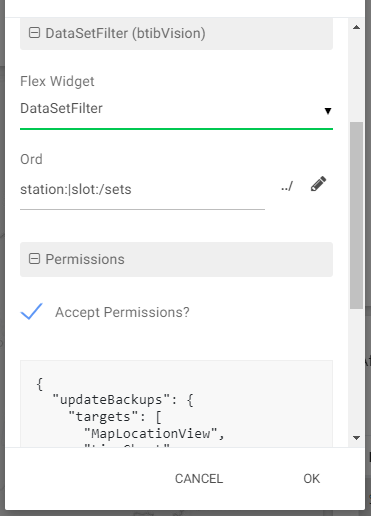
Please note that the description field in the DataSet is used as "name" here.
To use it with :
-
with a LiveChartView card (only Pie chart), you will need to add LiveChartGroup in your LiveChart. The LiveChartGroup needs to have the same name than a DataSet in the list.
-
with a MapLocationView card, you will need to add a DataSet in a MapAddress or a MapCoordinates component inside the MapLocationContainer component. The DataSet should have the same name than a DataSet in the list.
-
with an EnhancedBoundTable card, you will only need to add {dataSet} or {dataItem} parameter in your query. Then it will be replace by the value of the selected DataSet.
-
with a Markdown card, you can add {dataSet} to use it.
Flex Widget Properties
-
Ord: The Ord of the folder that contains the DataSets
-
AlphabeticalSorting: Sort the dataSet select options.
-
Default Station Order: Keep default WorkBench order list