
Description
The ExportConfig component allows you to target Tickets to Export and how to batch them.
Implementation
-
Child component of the TicketExport .
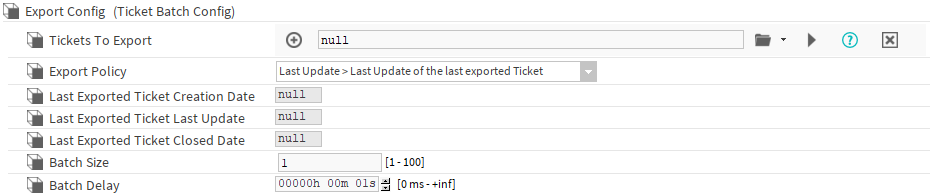
-
Using TQL(s), fill the TicketsToExport slot.
-
Select the ExportPolicy.
-
Change the BatchSize and BatchDelay if needed.
Currently, the ResponseTicketMapper will only work if the batch is set to 1.
Properties
-
TicketsToExport: TQLs used to target the Tickets to export.
-
ExportPolicy: Policy applied to exported Tickets. It applies a filter and sorts the exported Tickets.
-
Last Update > Last Update of the last exported Ticket
-
Exports only Tickets targeted by TicketsToExport with LastUpdate greater than LastExportedTicketLastUpdate.
-
Sorts Tickets by their LastUpdate value.
-
-
Creation Date > Creation date of the last exported Ticket
-
Exports only Tickets targeted by TicketsToExport with CreationDate greater than LastExportedTicketCreationDate.
-
Sorts Tickets by their CreationDate value.
-
-
Closed Date > Closed date of the last exported Ticket
-
Exports only Tickets targeted by TicketsToExport with ClosedDate greater than LastExportedTicketClosedDate.
-
Sorts Tickets by their ClosedDate value.
-
-
-
LastExportedTicketCreationDate: Stores the CreationDate value of the last exported Ticket.
-
LastExportedTicketLastUpdate: Stores the LastUpdate value of the last exported Ticket.
-
LastExportedTicketClosedDate: Stores the ClosedDate value of the last exported Ticket.
-
BatchSize: Defines how many Tickets will be exported in each batch.
-
BatchDelay: Defines the delay between two batches.